Canva Review 2026: Best Design Tool for Female Creators?
By HerYelle · Last updated on 2026-10-09 ·
Disclosure: HerYelle may earn a commission if you sign up through our links, at no extra cost to you. We only recommend tools we have tested ourselves.
Canva review: bottom line
Canva is the best design tool for female creators who need to publish fast without learning pro software: its template library + Magic Resize + Brand Kits is the most time-saving option in this series for non-designers. It is free to start (a genuine free plan) and it is AI-assisted, not AI-only — but it has no true vector/CMYK control, so if you want to trademark a logo or prepress-print, Illustrator is the better fit.
Best for
- Throughout this canva review, one use case kept standing out: female creators who publish visuals every week but aren’t designers.
- Female founders & creators who post often — Canva turns a thumbnail or carousel from a 30-minute job into a 9-minute one with templates. It’s the main reason canva for content creators became the default on-ramp.
- YouTubers & short-form video creators — 1280×720 thumbnails and 1080×1920 Reels/TikTok templates are pre-sized; no manual dimension math.
- Solopreneurs selling digital products — lead magnets, workbooks, and PDF guides come from the same Brand Kit you use for socials.
- Budget-conscious solos — a real free plan (unlike some pro-only rivals) covers occasional design forever.
- People who want one tool, not five — design, video, Presentations, and a social scheduler live in one tab.
Not ideal if
- You want real vector editing — Canva shapes are fill-only; no bezier pen, no true path editing like Illustrator/Figma.
- You want CMYK / print-prep accuracy — “PDF Print (CMYK)” is simulated in-browser; print shops report muddy shifts.
- You want a trademarkable logo — stock elements aren’t licensable for trademark; build identity in Illustrator/Affinity.
- You want pro-grade photo retouching — layer blending and advanced masking live in Photoshop, not Canva.
- You worry about template fatigue — unedited Canva layouts are instantly recognizable; you must restyle to stay on-brand.
Real-world example
In the real-world part of this canva review, meet Maya, a freelance newsletter writer and course creator. Before Canva her thumbnails took 28 minutes each and her lead magnet lived half-finished in Google Docs. The Visual Suite pulled design + PDF export into one surface.
Her Canva setup after a month:
- YouTube thumbnails — she starts from a 1280×720 template, swaps her face photo (Background Remover, Pro), and ships in 9 minutes.
- Instagram carousels — one Brand Kit (colors + fonts + logo) keeps every post recognizable; Magic Resize pushes the same idea to a 1080×1920 Reel.
- Lead magnet — a 12-page PDF workbook exported from the same Brand Kit; she sells it via her shop.
- Canva AI (Magic Write) — she drafts the carousel caption in-app instead of hopping to ChatGPT.
The cost: after a free start on the Free plan, she moved to **Canva Pro ~10/mo billed annually** — where Adobe Express Premium is ~9.99/mo and a Photoshop subscription is ~$22.99/mo. Canva replaced a $0 Docs draft and a standalone background-remover tool, and gave her a brand-consistent system. For a creator whose problem is visual output speed, that math is a steal.
Team fit
| Use case | Fit |
| Solo female creator posting weekly | ⭐⭐⭐⭐⭐ ideal |
| YouTubers / Reels / TikTok creators | ⭐⭐⭐⭐⭐ pre-sized templates |
| Solopreneurs (lead magnets, PDFs) | ⭐⭐⭐⭐⭐ Brand Kit + export |
| Small team / client work | ⭐⭐⭐⭐ Canva Business shared assets + approvals |
| Vector / logo identity work | ⭐⭐ Illustrator/Figma better |
| Print-prep / CMYK jobs | ⭐⭐ simulated only |
| Pro photo retouching | ⭐ Photoshop better |
Pricing
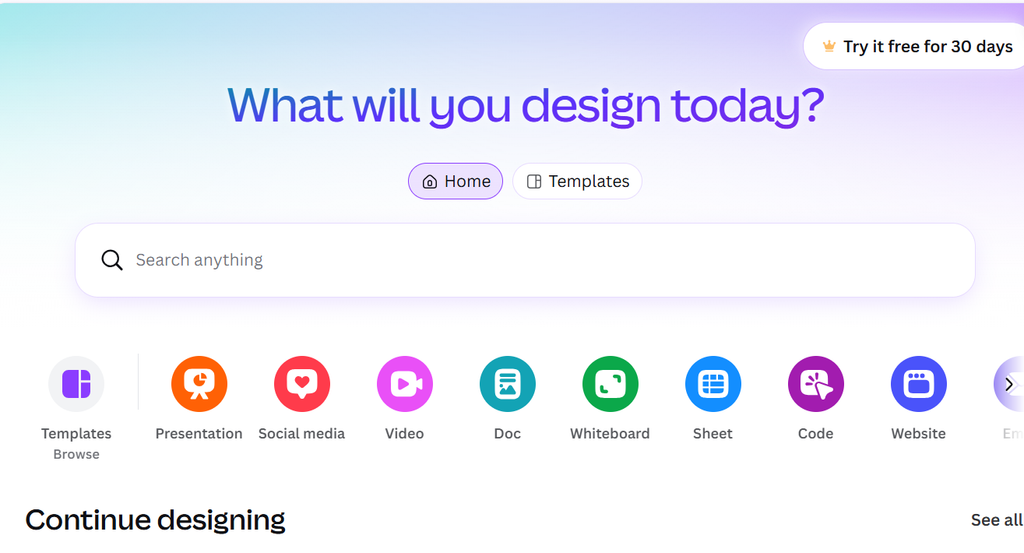
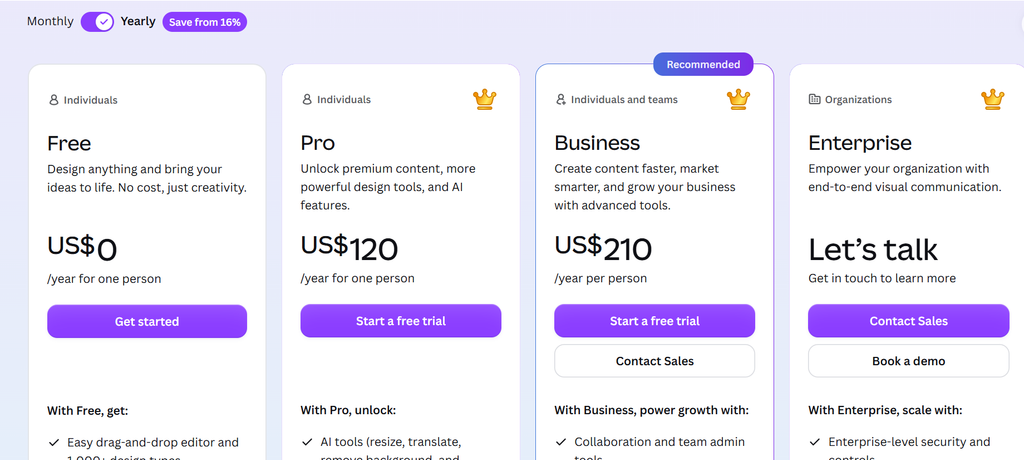
Free: $0 forever — drag-and-drop editor, 1,000+ design types, 1.6M+ templates, 4.7M+ photos/videos/audio, 1 Brand Kit (3 colors), 5GB storage, limited AI access. Genuinely usable for occasional design.
Pro: $10/mo billed annually for one person. Unlocks 3.6M+ premium templates, 141M+ stock assets, 5 Brand Kits, Magic Resize, Background Remover, social content scheduler, 100GB storage, 10× AI allowance.
Business (formerly Teams): **~200/year per person** billed annually. Adds 100 Brand Kits + approvals, team admin, 500GB storage, higher AI, ad insights, Flourish.
Enterprise: Custom quote — SSO/SCIM, 1,000 Brand Kits, 1TB, priority support, dedicated manager.
Verdict on price: Canva Free is the most generous free tier we’ve reviewed. Pro at ~$10/mo annual is the clear “yes, buy it” call for any creator publishing visuals 2×/week. You pay for speed and consistency, not for vector power.
What you get in Canva (Pro)
Canva ships a broad Visual Suite — none of Illustrator’s vector depth, but a uniquely all-in-one experience we leaned on throughout this canva review:
- Drag-and-drop editor — 1,000+ design types; start from 1.6M+ free or 3.6M+ premium templates.
- Magic Resize — canva magic resize reflows one design to any platform size in a click (Instagram → Reel → LinkedIn).
- Background Remover — one click to cut out a subject (Pro); huge for thumbnails.
- Brand Kits — lock colors, fonts, and logos so every design stays on-brand.
- Canva AI 2.0 — Magic Write (text), Magic Media (text-to-image/video), Dream Lab, Magic Eraser, Magic Edit.
- Video editor — timelines, transitions, captions, music; export MP4 for Reels/TikTok.
- Presentations & Docs — pitch decks and documents with the same assets.
- Social content planner — plan and schedule to 8+ platforms (Pro).
- Print Shop — order business cards, merch, and books printed and delivered.
- Apps & integrations — connect to your stack via the Canva Apps Marketplace.
Pros
- ✅ Fastest on-ramp for non-designers — templates turn ideas into posts in minutes.
- ✅ All-in-one Visual Suite — design, video, presentations, print, scheduler in one tab.
- ✅ Genuine free plan — usable forever, not a trial.
- ✅ Magic Resize + Brand Kits — consistency across platforms without redesign.
- ✅ Strong AI bundle — Magic Write, Magic Media, Background Remover on one sub.
- ✅ Huge asset library — 141M+ stock photos/videos/audio on Pro.
- ✅ Great value — Pro ~
10/mo annual beats Photoshop ~22.99/mo.
Cons
- ❌ No true vector editing — fill-only shapes; no bezier pen like Illustrator/Figma.
- ❌ Weak CMYK / print-prep — simulated in-browser; print shops report color shifts.
- ❌ Not for trademarkable logos — stock elements aren’t trademark-licensable.
- ❌ Template fatigue risk — unedited layouts look generic; you must restyle.
- ❌ Basic photo retouching — no layer blending or advanced masking.
- ❌ Per-seat Business cost — team pricing adds up; verify you need approvals.
- ❌ AI allowance caps — heavy Magic Media use hits monthly limits on lower plans.
Integrations that matter
- Social platforms — schedule to Instagram, Facebook, LinkedIn, TikTok, Pinterest, X, Google, Slack (Pro planner).
- Cloud storage — Google Drive, Dropbox, OneDrive import/export.
- Canva Apps Marketplace — third-party apps (some with limited credits) extend functionality.
- Brand & DAM — connect asset libraries; Enterprise adds custom integrations + APIs.
- No pro design APIs for individuals — deep automation is Enterprise-tier, not solo.
Verdict
canva review verdict: For a female founder or creator whose real problem is visual output speed — publishing thumbnails, carousels, and lead magnets without design training — Canva is the most accessible way to ship: the template library + Magic Resize + Brand Kits is genuinely better than starting from a blank canvas in pro software.
At Pro ~$10/mo annual (or free to start), it’s the best value in this series for non-designers, with a real free tier. The catch is depth: no vector pen, no true CMYK, so it won’t replace Illustrator for logos or print prep.
In the final call of this canva review, start on the free plan, ship one real thumbnail and one carousel through it this week, and only upgrade to Pro if Background Remover + Brand Kits + Magic Resize save you more than ~$10/mo. If your job is logo identity or prepress print, Illustrator wins; if it’s weekly content, Canva wins.
What Canva is built for
Canva is not Photoshop and not Figma — its own site frames it as the Visual Suite for Everyone. Before you subscribe, here are the official application scenarios worth knowing:
- Social posts & thumbnails — sized templates for every platform; publish in minutes.
- Short-form video — Reels/TikTok videos with captions, music, and transitions.
- Presentations & docs — pitch decks and documents from the same asset library.
- Brand consistency — Brand Kits lock colors/fonts/logos across a team.
- Print & merch — business cards, books, and apparel via Print Shop.
- AI creation — Magic Write, Magic Media, and Dream Lab turn prompts into designs.
- Team workflow — shared folders, approvals, and admin on Business/Enterprise.
The method behind it. Canva’s design rests on one principle: non-designers should ship professional visuals without training. For time-pressed creators, that speed is the product. This canva review maps each scenario to a real creator workflow below.
Explore further
- Routine Review 2026: Best AI Planner for Female Creators?
- Lifestack Review 2026: Energy Planner for Female Creators?
- Superlist Review 2026: Tasks & Notes for Busy Female Creators?
- Sunsama Review 2026: The Calm Planner for Female Creators?
- Akiflow Review 2026: Time-Blocking Planner for Busy Female professionals?
- TickTick Review 2026: The Calm To-Do App for Busy Female Creators
- Todoist Review 2026: Best To-Do APP for Female Creators?
FAQ
These are the most common questions we answered during this canva review.
Is there a free Canva plan?
Yes — the canva free plan is a real free tier usable forever: drag-and-drop editor, 1.6M+ templates, 1 Brand Kit, 5GB storage, limited AI. Pro unlocks Magic Resize, Background Remover, 141M+ assets, and 5 Brand Kits.
Does Canva have AI?
Yes — canva ai tools bundle Magic Write (text), Magic Media (text-to-image/video), Dream Lab, Magic Eraser, and Background Remover. Paid plans get a 10× (Pro) or higher (Business) monthly AI allowance; free is limited.
Is Canva Pro worth it for female creators?
If you publish visuals 2×/week, Pro’s Background Remover + Brand Kits + Magic Resize pay for themselves in saved hours — the clearest “buy it” call for a graphic design tool for female creators.
Does Canva work on mobile?
Yes — the iOS/Android app covers most edits; desktop is better for precise alignment and bulk work.
Can I make a printable lead magnet in Canva?
Yes — export PDF; for store-ready print use PDF Print, but expect simulated CMYK. For trademarkable logos, move to Illustrator/Affinity.
Why trust our software reviews
We test every tool hands-on as working creators — not just reading spec sheets.