
Juno Review 2026: Calmer Daily Planner for Female Creators?
By HerYelle · Last updated on 2026-09-26.
Disclosure: HerYelle may earn a commission if you sign up through our links, at no extra cost to you. We only recommend tools we have tested ourselves.
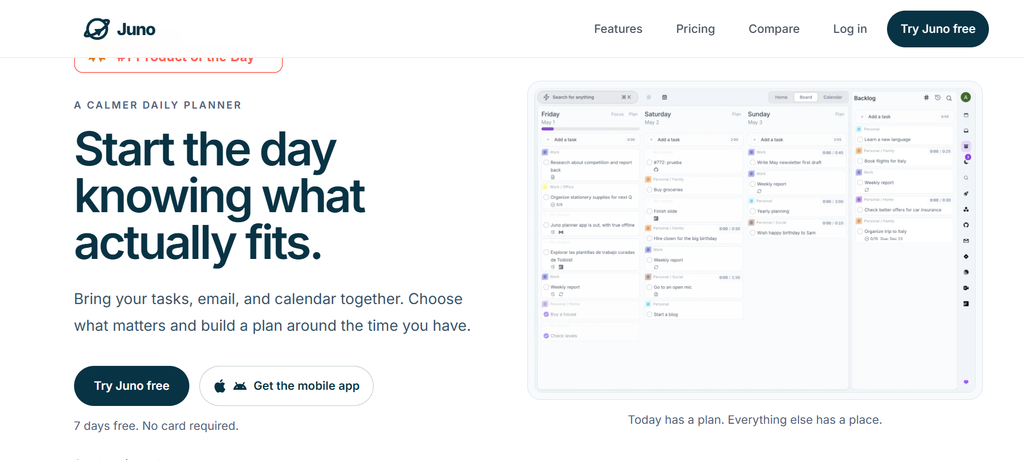
This Juno review looks at the calm daily planner that refuses to overwhelm you with a second brain. Its bet is calendar-grounded planning: it pulls your tasks, email, and calendar into one surface and shows your to-dos side-by-side with your meetings, so a female creator stops reacting to urgency and starts shaping a realistic day. If you’re a female creator who wants her scattered tasks (Todoist + Gmail + Google Calendar) gathered into one calm plan she actually follows, this productivity app for female creators is the alternative to an AI-powered, feature-bloated OS.
Juno is a cross-platform (web, iOS, Android) daily planner built around one idea: stop planning against a fantasy day and start planning around the time you actually have. We ran it for a month on a real solo-creator workflow (a content business + an online course + a household) to see if the paid plan earns its place next to Akiflow, Sunsama, and Timestripe.
Juno review: bottom line
Juno is the calmer daily planner: if you’re a female founder or creator who wants to start the day knowing what actually fits, its calendar-based planner + daily rituals is the most deliberate option in this series. It is moderately priced (a 7-day free trial, then $10/mo or $100/yr) and it is not marketed as AI — but it has no free tier beyond the trial and no AI agents, so if you want an AI to run your schedule or a permanent free plan, this isn’t it.
Best for
- Throughout this Juno review, one use case kept standing out: female creators who want one calm surface for everything, not a louder one.
- Female founders & creators juggling tasks + email + calendar — Juno keeps them as one linked plan; no app-hopping between Todoist, Gmail, and Google Calendar.
- Calendar-grounded planners — the time-blocking + time-tracking view puts your to-dos next to your meetings so the day fits reality, not a wish list.
- People who want a deliberate ritual — daily rituals open the day by choosing what matters and close it with a clean shutdown; nothing slips through.
- High-focus solos — overload protection and “pull, not push” integrations mean you decide what enters today, not your inbox.
- Offline-first workers — review and edit your plan on a plane or with bad Wi-Fi; changes sync when you reconnect.
Not ideal if
- You want a permanent free plan — Juno is trial-only (7 days, no card); after the trial, billing starts or the account goes read-only. Unlike Akiflow/Sunsama (also trial-only), there is no free tier to grow into.
- You want an AI planner — Juno is not marketed as AI (no Aki, no AI meeting notes, no AI agents). Its “smart auto-scheduling” and “integration automations” are workflow rules, not LLM intelligence. If you want AI, Akiflow, Sunsama, or Routine is the pick.
- You want deep two-way project integrations — Juno pulls from Google Calendar, Gmail, Todoist, Linear, GitHub, Outlook, Jira, Asana, Notion, Trello, ClickUp, and Microsoft To Do, but your team stays in those apps; it’s not a PM hub like ClickUp/Asana.
- You want a long-term vision board — Juno is a daily planner; Timestripe’s Horizon goals are the better long-range tool.
- You expect a tiny, indie maker — Juno is a small, funded team (Product Hunt #1 Product of the Day), which is exciting but means some features (desktop app, more integrations) are still landing.
Real-world example
In the real-world part of this Juno review, meet Priya, a freelance content strategist. Before Juno her tasks lived in Todoist, her client emails in Gmail, and her meetings in Google Calendar — three surfaces, constant context-switching, and a to-do list that ignored her real availability.
Her Juno setup after a month:
- Calendar-based planner — she sees her deep-work blocks and client calls beside her tasks, so she finally plans around meetings, not against them.
- Daily rituals — a 5-minute morning ritual picks today’s three priorities; an evening ritual carries unfinished work forward and closes the day.
- Pull, not push — she drags only the emails that matter from Gmail into her plan; the rest stay in the inbox, not her head.
- Time tracking — she logs hours on client work so next week’s estimate matches reality.
The cost: after a 7-day trial, $10/mo** — where Akiflow is $192/yr and Sunsama is 204/yr, Juno's **100/yr is roughly half the price and includes calendar time-blocking. She didn’t cancel anything — Juno pulled from Todoist and Gmail and gave her one calm plan. For a creator whose problem is scattered attention, that math is a steal.
Team fit
| Use case | Fit |
| Solo female founder / creator wanting one calm surface | ⭐⭐⭐⭐⭐ ideal |
| Calendar-grounded planners (time-blocking + tracking) | ⭐⭐⭐⭐⭐ the differentiator |
| High-focus solos (overload protection, pull-not-push) | ⭐⭐⭐⭐⭐ deliberate day |
| Offline-first workers | ⭐⭐⭐⭐⭐ offline-first sync |
| Light collaboration (client/partner) | ⭐⭐⭐ shares a plan, but team stays in source apps |
| AI-auto-scheduling fans | ⭐ none — Juno is not marketed as AI |
| Agency / enterprise PM | ⭐⭐ limited — pull integrations, not a PM hub |
Pricing
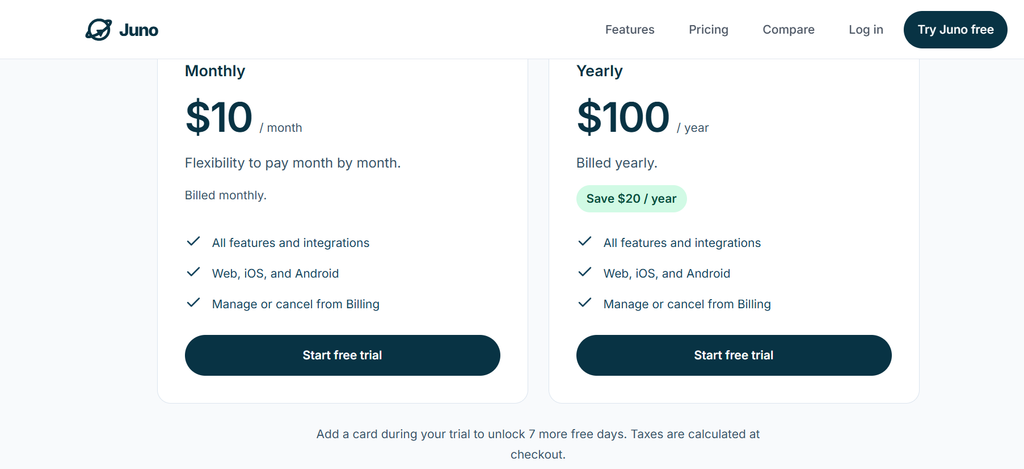
Free trial: 7 days free, no card required — the full product, every feature and integration. Add a card during the trial to unlock 7 more free days (≈14 days total). There is no permanent free plan — after the trial, billing starts or the account becomes read-only until you pick a plan. A juno free plan in the “forever free” sense does not exist.
Monthly: $10 per month — everything: all features and integrations, web/iOS/Android, manage or cancel anytime.
Yearly: **$100 per year** — same everything, billed yearly; saves $20/year versus paying monthly (≈$8.33/mo effective).
Price note (verified 2026-09-26 from juno.do homepage + pricing block; cross-confirmed by Product Hunt founder at $10/mo, $100/yr): Juno is trial-only with no lifetime licence. A launch discount code (HUNTED30OFF, 30% off) was a limited-time launch promo, not standard pricing.
Verdict on price: Juno is among the cheaper planners we’ve reviewed. At **100/yr**, it undercuts Akiflow (192/yr) and Sunsama (204/yr) by nearly half, and matches Routine's Professional tier (120/yr) while staying simpler. You pay for calm + calendar grounding, not for AI or enterprise PM.
What you get in Juno (all paid plans)
Juno ships a focused, opinionated set of features — less AI noise than Routine, but a uniquely calm experience:
- Calendar-based planner — tasks, email, and calendar in one surface; to-dos sit beside meetings so the plan fits real time.
- Time blocking & time tracking — drag tasks onto the calendar and log hours so tomorrow’s plan matches reality.
- Daily rituals — open the day by choosing what matters, close it with a clean shutdown; nothing important slips through.
- Pull, not push integrations — connect Google Calendar, Gmail, Todoist, Linear, GitHub, Outlook, Jira, Asana, Notion, Trello, ClickUp, Microsoft To Do; you decide what enters today.
- Inbox to tasks — turn important emails into next actions without losing the original context.
- Contexts & tags + recurring tasks — separate work, life, and long-term priorities; keep recurring responsibilities visible.
- Offline-first — review and edit with no connection; changes sync across devices when you reconnect.
Pros
- ✅ Truly calendar-grounded — to-dos beside meetings, time blocking, and time tracking in one view; ends “I planned but had no time.”
- ✅ Calm by design — daily rituals and overload protection push back on urgency culture; deliberately less noisy than an AI OS.
- ✅ Pull, not push — integrations respect your attention; you choose what enters the day.
- ✅ Offline-first — fully functional without internet; instant local edits, synced later.
- ✅ Reasonably priced — $10/mo or $100/yr; roughly half of Akiflow/Sunsama.
- ✅ Cross-platform — web, iOS, and Android with native mobile apps.
- ✅ Strong social proof — Product Hunt #1 Product of the Day; praised by engineering managers, PMs, and founders.
Cons
- Calendar & email & project tools — Google Calendar, Gmail, Outlook, Todoist, Linear, GitHub, Jira, Asana, Notion, Trello, ClickUp, Microsoft To Do, and more, pulled into one planning system.
- Inbox to tasks — turn emails into actions without leaving the plan.
- Mobile & web & offline — native iOS/Android apps plus web; offline-first with background sync.
- No AI layer — unlike Akiflow (Aki + MCP), Sunsama (AI + MCP), and Routine (AI agents), Juno does not market AI; automation is workflow rules only.
- No public API (yet) — automations are in-product; external triggers are limited.
What Juno is built for
Juno is not a calendar and not a checklist — its own site frames it as “Bring your tasks, email, and calendar together. Choose what matters and build a plan around the time you have.” Before you subscribe, here are the official application scenarios worth knowing:
- Gather — review what competes for your attention; browse connected work beside your tasks and calendar, then choose what belongs in today.
- Decide — choose what actually matters; cut the noise and prioritize on purpose instead of reacting to urgency.
- Shape — build a plan that fits your day using estimates, available hours, meetings, and overflow.
- Daily rituals — open the day by deciding what matters, protect focus while you execute, and close it knowing nothing slipped through.
- Inbox to tasks — turn important messages into next actions without losing context.
- Contexts & tags — separate work, life, and long-term priorities so switching feels deliberate.
- Offline — keep reviewing and adjusting your plan when the connection drops.
The method behind it. Juno’s design rests on one principle: from push culture to a planning system where inboxes become inputs and you choose what enters the day. For attention-fragmented creators, that restraint — a calm daily planner with no AI noise — is the product. It is the opposite pole from the AI-native Routine in this series.
Don’t just take our word for it. Juno is a transparent, small team (Product Hunt #1 Product of the Day) with real testimonials from an Engineering Manager, a Financial Cybersec Expert, a Product Manager, and founders who switched from Todoist, Akiflow, and Notion. Its differentiators (calendar grounding, daily rituals, pull-not-push) are documented on the site itself — verifiable and honest, if smaller-scale than the giants.
Verdict
Juno review verdict: For a female founder or creator whose real problem is scattered attention, Juno is the most deliberate way to run a day: the calendar-based planner + daily rituals is a genuinely better model than a flat to-do list or three disconnected apps.
At $10/mo or $100/yr, it’s among the cheaper planners in this series, with a free trial to start. The catch is scope: no AI marketing and no permanent free plan, so it won’t run your schedule for you the way an AI OS would, and you can’t stay free forever.
In the final call of this Juno review, start on the 7-day trial, pull your tasks and calendar in, and only subscribe if the calm daily ritual sticks. If your pain is a quiet daily plan, Sunsama is the gentler buy; if it’s tool sprawl plus AI help, Routine wins; if it’s attention and a realistic day, Juno wins.
Explore further
- Routine Review 2026: Best AI Planner for Female Creators?
- Lifestack Review 2026: Energy Planner for Female Creators?
- Superlist Review 2026: Tasks & Notes for Busy Female Creators?
- Sunsama Review 2026: The Calm Planner for Female Creators?
- Akiflow Review 2026: Time-Blocking Planner for Busy Female professionals?
- TickTick Review 2026: The Calm To-Do App for Busy Female Creators
- Todoist Review 2026: Best To-Do APP for Female Creators?
FAQ
Is there a free Juno plan?
No permanent free tier — Juno is trial-only: 7 days free with no card required (add a card to extend to ~14 days). After the trial, billing starts or the account becomes read-only until you pick a plan. So a “juno free plan” you can keep forever does not exist, unlike some tools with a real free tier.
Does Juno have AI?
No — and this is not a marketing accident. Juno has no AI assistant, no AI meeting notes, no AI agents. Its “smart auto-scheduling” and “integration automations” are workflow rules, not LLM intelligence. (Some third-party aggregators wrongly label Juno “AI-powered” — that is not the official position.) If you want an AI planner, Akiflow, Sunsama, or Routine is the better match.
Does Juno sync with Google Calendar / Outlook?
Yes — it connects Google Calendar, Outlook, and more, showing all your calendars where your tasks live, with drag-to-calendar time blocking. It’s a pull integration: your team stays in the original apps, and Juno shows their work as inputs you choose to plan.
Why trust our software reviews
We test every tool hands-on as working creators — not just reading spec sheets.
Related reads
- Routine Review 2026: Best AI Planner for Female Creators?
- Lifestack Review 2026: Energy Planner for Female Creators?
- Superlist Review 2026: Tasks & Notes for Busy Female Creators?
- Sunsama Review 2026: The Calm Planner for Female Creators?
- Akiflow Review 2026: Time-Blocking Planner for Busy Female professionals?
- TickTick Review 2026: The Calm To-Do App for Busy Female Creators
- Todoist Review 2026: Best To-Do APP for Female Creators?