TickTick Review 2026: The Calm To-Do App for Busy Female Creators
By HerYelle · Last updated on September 17, 2026.
Disclosure: HerYelle may earn a commission if you sign up through our links, at no extra cost to you. We only recommend tools we have tested ourselves.
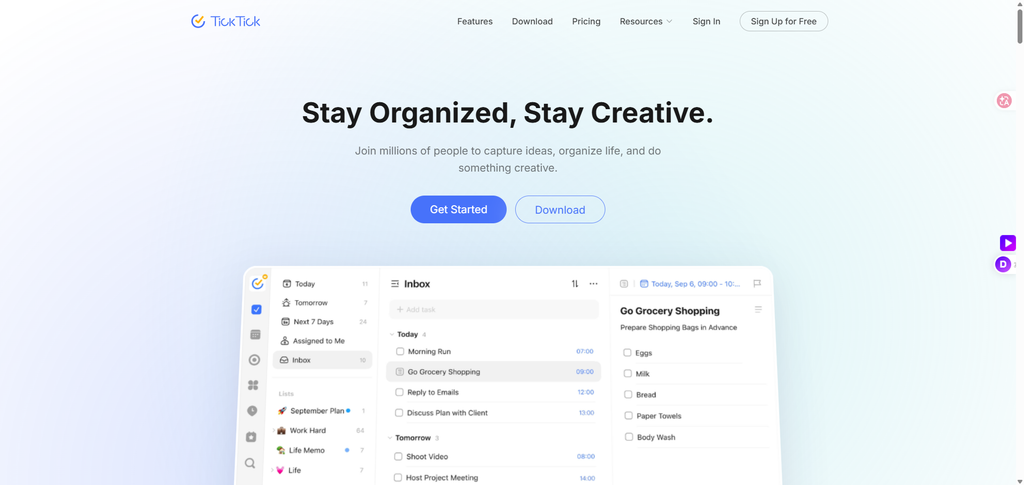
In this TickTick review, we look at a to-do app that grew up with the mobile era — and quietly became part of daily life.
In the tech industry, to-do apps were once called one of the “indie-developer trilogy.” Now they are considered one of the “one-person company (OPC) trilogy.” Some people think they are low-barrier tools, but they have slipped into the fabric of how modern creators actually work.
Go back to around 2013: mobile internet was expanding fast, smartphones were starting to replace traditional PCs as the most important digital terminal, and the core mission of task-management software was simple — help users remember things that are easy to forget.
Back then, most early to-do apps were essentially digital sticky notes. You wrote down a task, set a reminder, and waited for the system to notify you at the right time.
TickTick started from that same need. Cross-platform sync, recurring tasks, priority management, and tag-based organization formed its first-generation feature set. Today those capabilities are industry standard; back then they meaningfully improved the user experience.
That seamless, smooth, differentiated experience earned TickTick its first loyal users. For the first time, you could plan on a computer, receive reminders on your phone, and check progress on a tablet. TickTick entered its own long growth phase — and it has stayed good ever since.
TickTick review: bottom line
TickTick is the long-termist’s task manager: free to start, $49.99/year to unlock everything, and the only mainstream app that bundles tasks + Google calendar + habits in one subscription. If you want a system you can trust for a decade, not a flashy app that might pivot next year, this is it.
Best for
- Long-term thinkers who hate re-learning their tools every year — TickTick offers a rich feature set.
- Mompreneurs & solo female creators running home + side hustle from one workspace (the free 9-list limit is actually enough to start).
- Value seekers who want the most bundled features per dollar — $49.99/year covers tasks + calendar + Pomodoro + habits in one plan.
- Habit + focus builders who want streaks and Pomodoro baked in, not bolted on via another paid app.
Not ideal if
- You need team project management — there is no business/per-seat plan; share is capped at 29 members on Premium.
- You live entirely in Notion and want tasks fused with docs/databases.
- You are Apple-only and want native design — Things 3 feels more “Mac” (but costs more and does less).
Real-world example
Lin, a Shanghai mompreneur (home + weekend side business). She has used TickTick since 2020 — through pregnancy, maternity leave, and launching a small Etsy-style shop. Her setup:
- Work list (day job) with Kanban columns: To Do / In Progress / Review / Done.
- Family list for vaccinations, school events, and grocery restocks.
- Side-business list with a Monday recurring template: “outline Reel → film → edit → schedule.”
- Habit tracker for 30-min reading and a 25-min Pomodoro block before deep work.
When she hit a sync glitch between her iPad and phone last spring, she opened the in-app chat. “The support reply came in under an hour and actually fixed it — not a canned ‘restart your device’.” That after-sales experience is exactly why she never migrated to a trendier app. For a solo creator, a tool whose support picks up the phone matters more than a new AI badge.
The AI MCP moment. In 2026 TickTick shipped an official MCP server (mcp.ticktick.com). Lin connected it to Claude in two minutes — one click in the connectors directory, OAuth sign-in, done. Now every Sunday she types: “Move everything overdue in my Side-business list to this week and flag the two most urgent.” Claude restructures her whole system in one sentence — the exact chore she used to do by hand. The MCP feature is the “AI ✖️ TickTick” playbook Chinese creators are sharing on Xiaohongshu right now.
Team fit
| Use case | Fit |
| Solo female creator | ⭐⭐⭐⭐⭐ ideal |
| Mom + home management | ⭐⭐⭐⭐⭐ ideal |
| Grad-school / exam prep | ⭐⭐⭐⭐⭐ habits + Pomodoro |
| Small team (≤29) | ⭐⭐⭐⭐ good |
| Agency / enterprise | ⭐⭐ limited, no per-seat plan |
Pricing
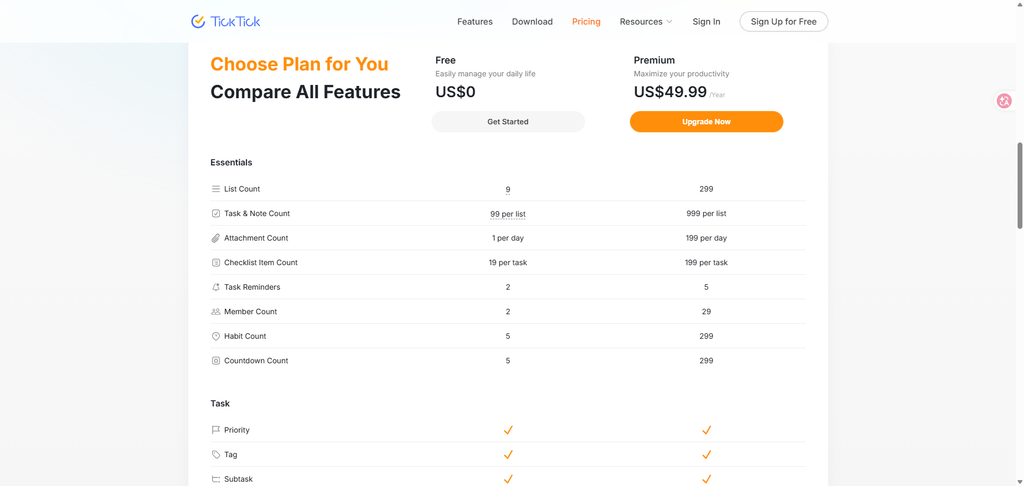
Free: genuinely usable — 9 Lists, 99 Tasks per list; List & Kanban Views; NLP; Task Reminders; Cross-Platform Sync.
Premium: $49.99/year — 299 Lists, 999 Tasks per list; Multiple Calendar Views; Task Duration; Email Reminder; Themes; And more.
Prices as of September 2026 (international Premium, confirmed on ticktick.com/upgrade). Monthly billing is slightly higher than annual.
Verdict on price: At 49.99/year, TickTick undercuts Todoist Pro (60/yr) https://www.todoist.com/ and bundles Multiple Calendar Views, Pomodoro, and habits that Todoist charges extra for (or lacks). If you use the calendar view or habit tracker, the value is immediate.
What you get in TickTick Premium
TickTick Premium is sold as “All in TickTick Premium” around three official promises:
- All Platforms — phone, desktop, tablet, watch, and web, all kept in sync.
- Multiple Calendar Views — switch between list, day, week, and month layouts; Premium unlocks Task Duration planning and deeper calendar control.
- Enjoy 10x Capacity — jump from the free 9 lists / 99 tasks to 299 lists / 999 tasks per list.
Premium also adds Email Reminder, Themes, and the AI / MCP features covered below.
Pros
- ✅ Long-term stability — same trusted app , no pivot risk.
- ✅ All-in-one — tasks + calendar + Pomodoro + habits in one sub, replaces 2–3 paid apps.
- ✅ Affordable price — $49.99/year is student-budget level.
- ✅ Official AI MCP (2026) — chat-driven task management, no API keys for the hosted version.
- ✅ Genuinely good free tier — 9 lists is enough to run a real life.
- ✅ Responsive after-sales — real users report fast, helpful support (see Xiaohongshu notes).
- ✅ Cross-platform — phone, desktop, tablet, watch, web, all synced.
Cons
- ❌ Free plan caps at 9 lists — heavy project users feel it fast.
- ❌ No team/business tier — per-seat scaling requires another tool.
- ❌ MCP has no event triggers — it plans on request, it does not watch your inbox.
- ❌ Premium is
49.99/yr — higher than some one-time-purchase rivals, but it still undercuts Todoist Pro (60/yr). The value only shows if you actually use the bundled calendar, habits, and Pomodoro. - ❌ UI is functional, not beautiful — fewer themes than some competitors (though 40+ themes exist).
Integrations that matter
- Calendar: two-way sync with Google Calendar, Apple Calendar, Outlook (Premium).
- AI / MCP: official mcp.ticktick.com; also community servers (ticktick-mcp) for Claude Desktop / Code.
- Voice & audio: AI voice input extracts time + priority; recording summary turns meetings into structured tasks.
- Third-party: Notion import, subscription calendars, filter/keyboard-shortcut power user flows.
- Automation: MCP, CLI, OpenClaw workflows for repeating operations.
What TickTick is built for
TickTick is not just a checklist — its own site frames it as an all-in-one productivity app that helps you “stay organized, stay creative.” Before you subscribe, here are the official application scenarios worth knowing:
- To-Do List — “Organize everything in your life”: work projects, personal tasks, and study plans in one place.
- Calendar Views — “Easily plan your schedule” with yearly, monthly, weekly, daily, agenda, multi-day, and multi-week layouts.
- Pomodoro — “Track time and stay focused” using the 25-minute interval technique to beat procrastination.
- Habit Tracker — “Develop and maintain good habits” with a rich habit library and insightful statistics.
- Countdown — “Capture every important moment”: birthdays, anniversaries, exams, and project deadlines.
- Kanban — group tasks into columns by status or team (product, design, dev, ops) for an at-a-glance board.
- Timeline — a lighter project-management view (vs Gantt) with draggable task durations.
- Eisenhower Matrix — see priorities by urgency vs importance and focus on what matters.
- Sticky Note & Quick Capture — jot ideas before they slip away.
- AI: Voice Capture — “Speak naturally to capture tasks. AI automatically extracts dates, priorities, and creates multiple tasks at once.”
- AI: Audio Summary — “Turn meeting recordings or voice notes into accurate transcripts and structured summaries in one tap.”
- AI: Automated Workflows — “Connect via MCP, CLI, or OpenClaw to automate your workflows and build custom productivity setups.”
- Reminders that stick — Constant, Repeat, Email, Daily, and Location reminders so nothing falls through.
- Cross-platform sync — phone, computer, tablet, watch, and web, all in real time.
Don’t just take our word for it. “My favorite app of the entire year which is my to-do app. It’s called TickTick.” That kind of decade-long loyalty is rare in productivity software — and it is exactly the long-term stability this review keeps coming back to.
If you are a student or teacher, TickTick for Education gives eligible users 25% off Premium, so the all-in-one suite is even easier to start.
Verdict
TickTick review verdict: For female creators who value a tool that lasts, TickTick is the safest long-term bet — free to start, $49.99/year to unlock the whole system, and the new AI MCP feature turns “Sunday night restructuring” into one chat sentence. Start on Free, move to Premium the moment you outgrow 9 lists or want calendar + habits + Pomodoro in one place. It will still be here, and still good.
Explore further
FAQ
Is TickTick free?
Yes — the free plan gives 9 lists, 99 tasks per list, basic calendar/habit/Pomodoro, and full sync. It is functional indefinitely for light use.
Does TickTick have AI?
Yes — voice input, recording summary, and an official MCP server (2026) that lets Claude or any MCP client create, search, and reorganize your tasks by chat.
How do I use the TickTick MCP feature?
Find TickTick in your AI client’s connectors directory (e.g. Claude), click connect, OAuth sign in, and start chatting: “Add ‘renew passport’ to Personal, due Friday, high priority.” Help Center about Feature list FAQ in this AI Features
Why trust our software reviews
We test every tool hands-on as working creators — not just reading spec sheets.