Sunsama Review 2026: The Calm Planner for Female Creators?
By HerYelle · Last updated on September 22, 2026.
Disclosure: HerYelle may earn a commission if you sign up through our links, at no extra cost to you. We only recommend tools we have tested ourselves.
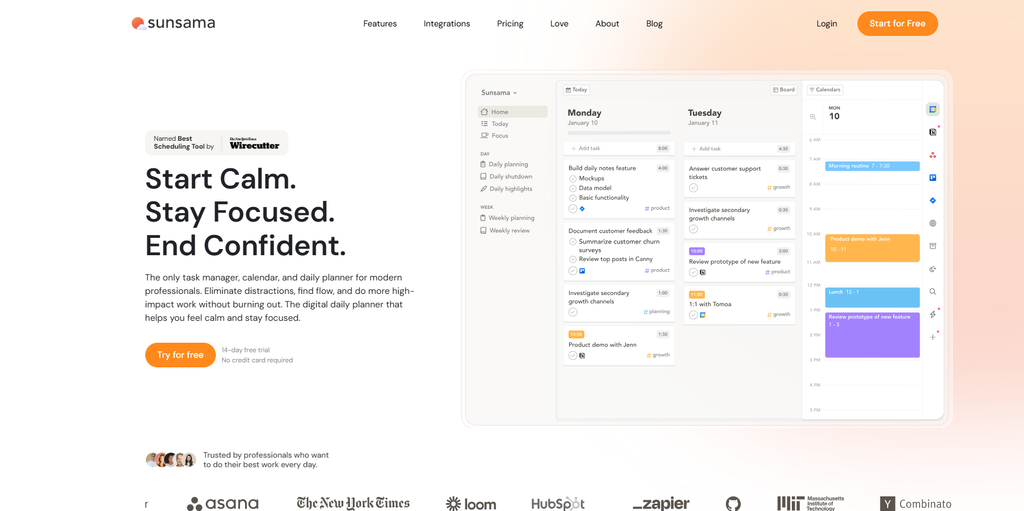
In this Sunsama review, we look at the planner that actively refuses to do what most productivity apps now do: it does not auto-stuff your calendar with AI. Instead, Sunsama walks you through a short, manual planning ritual every morning and a daily shutdown every evening — so you decide what fits today, instead of an algorithm deciding for you.
Sunsama launched in 2017 (YC-backed, founded by Matthieu Lion and Ashley Mayer) and has built a cult following among professionals who burned out on “optimize everything” tools. Where Akiflow and Motion race to auto-schedule your life, Sunsama slows you down on purpose. That difference is the whole product.
Its own philosophy — published as a Pricing Manifesto and baked into the UI — rests on three ideas: plan with intention, protect focus, and end the day without guilt. We ran it for a month on a real solo-creator workflow (client work, content, and a personal life scattered across five tools) to see if the $17/month annual plan earns its place.
Sunsama review: bottom line
Sunsama is the calm, manual daily planner: if you’re a female founder or creator who is tired of AI auto-scheduling and wants a short, intentional ritual that puts you in control of the day, it is the most humane planner in the category. It is not cheap (17–22/month, no free tier) and it is deliberately low-automation — but for someone who wants work-life balance without an algorithm bossing them around, the guided planning + daily shutdown workflow is genuinely the calmest daily experience we tested.
Best for
- Female founders & creators who want calm, not hustle — the morning ritual forces you to choose a realistic workload, not just collect tasks.
- Burnout-prone professionals — Sunsama’s whole pitch is “do great work without burning out”; the shutdown ritual ends the day on time, guilt-free.
- Manual planners who like control — you timebox tasks onto the calendar yourself; no AI silently reshuffling your life.
- Work-life balance seekers — it plans personal chores and work in the same view, so life doesn’t get squeezed out.
- Apple Calendar users — unlike Akiflow, Sunsama has native 2-way sync with Google, Outlook, AND Apple Calendar.
- Enterprise / IT-approved use — SOC2 compliant, SAML/SSO on the enterprise tier, and a team that will fill out your IT security questionnaire.]
Not ideal if
- You need a free tool — Sunsama has no free-forever plan (by design, per its manifesto); only a 14-day trial, no credit card required. For free, Todoist wins.
- You want AI to auto-schedule your day — Sunsama deliberately does NOT auto-plan; you drag tasks onto the calendar. Akiflow’s Aki or Motion will do it for you.
- You want heavy team / project management — it’s a daily planner, not Asana; no Gantt, no shared workload boards (Enterprise adds SSO, not collaboration features).
- You want maximum integrations — Sunsama covers the core (calendar, Slack, Teams, Asana, Trello, Jira, email, Zapier) but stops there. Akiflow claims 2,000+.
- You’re price-sensitive — at $204/year it costs ~4× TickTick and ~3.4× Todoist for a more minimal feature set.
- You want deep customization / theming — Sunsama is opinionated and simple by design; power users who want to tweak everything will feel constrained.
Real-world example
Elena, a freelance UX writer + adjunct instructor (Austin-based, remote clients). Before Sunsama she ran her day across four surfaces: client work in Asana, teaching prep in Google Calendar, personal errands in Apple Reminders, and a stray to-do list in Notes. Every morning was reactive — she’d open the day already behind.
Sunsama review setup after a month:
- Start-of-day ritual (the app prompts it): she pulls today’s Asana client tasks + a Google Calendar teaching block + two Apple Reminders errands into one plan, then honestly asks “what actually fits today?” and drops the rest to tomorrow. “It’s the only app that makes me admit I’m overloaded before I burn out.”
- Timeboxing: she drags the “Draft onboarding flow” task onto her calendar as a 90-minute block, color-coded, so the work has a home instead of floating.
- Daily shutdown: at 5pm the app nudges her to review what got done, auto-logs her “wins,” and she closes the day without the usual guilt spiral. “End work on time, without guilt” is literally a feature, and it worked.”
- Pomodoro Timer + Mute apps: during a focus block she mutes Slack/Teams so interruptions don’t break flow.
- Analytics: weekly she sees where her time actually went — revealing she spent 11 hours on email-adjacent work and only 9 on billable writing, which she then rebalanced.
The cost: at $17/month annual she pays $204/year where TickTick is $49.99. But she cancelled a $12/month motion-sub she never trusted and stopped paying for a separate focus timer app — so Sunsama replaced two tools and the anxiety of an auto-scheduling AI rearranging her life. For a one-person business that values calm, that math closes.
Team fit
| Use case | Fit |
| Solo female founder / creator | ⭐⭐⭐⭐⭐ ideal (calm, intentional) |
| Burnout-prone knowledge worker | ⭐⭐⭐⭐⭐ the core audience |
| Work-life balance seeker | ⭐⭐⭐⭐⭐ plans life + work together |
| Apple Calendar user | ⭐⭐⭐⭐⭐ native 2-way sync (Akiflow is not) |
| Deep-work / focus builder | ⭐⭐⭐⭐ Pomodoro + mute + timeboxing |
| Small team collaboration | ⭐⭐ limited — daily planner, not PM tool |
| Agency / enterprise | ⭐⭐⭐ SOC2 + SSO, but no shared project boards |
| AI-auto-scheduling fan | ⭐ no auto-plan; you stay in control |
Pricing
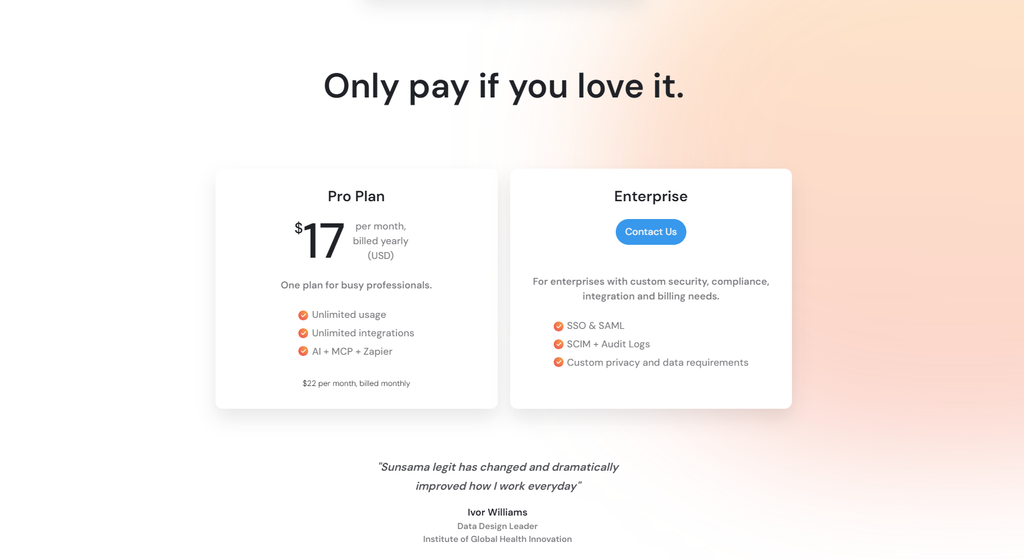
Free: none — Sunsama has no free-forever plan (a deliberate stance in its Pricing Manifesto: free plans “create bad incentives”). Today there is only a 14-day free trial, no credit card required, full Pro features, cancel anytime.
Pro Monthly: $22/month — unlimited usage, unlimited integrations, AI + MCP + Zapier.
Pro Yearly: 17/month, billed annually (204/year) — ~23% savings vs monthly (the site’s manifesto cites a 20% annual discount; $22 × 0.8 ≈ $17.60, displayed as $17). All Pro features included.
Enterprise: Contact sales — SSO & SAML, SCIM + audit logs, custom privacy/data requirements, SOC2. For teams with custom security/compliance/billing needs.
Sunsama review Price note (verified Sept 2026): The pricing page headline shows $17/mo annual / $22/mo monthly. An older FAQ snippet on the same page still references “25/mo (20 annual)” — that appears to be stale copy; the headline figures are current. Sunsama prices in whole dollars (no $XX.99 psychological pricing) and runs no fake sales (no Black Friday discounts).
Verdict on price: Sunsama is one of the pricier calm planners — at 204/year it costs ~4.1× TickTick Premium (49.99/yr) and ~3.4× Todoist Pro (60/yr), and slightly more than Akiflow (192/yr). You pay for intentionality and a sustainable business model, not for feature breadth or AI auto-scheduling. If you want an algorithm to run your day, it’s the wrong buy; if you want a daily ritual that protects your sanity, the price is the point.
What you get in Sunsama (Pro)
Unlike apps that gate features behind tiers, Sunsama ships essentially one plan with everything:
- Guided daily planning ritual — “Start your day with clarity”: align goals, prioritize, and set a realistic workload instead of an aspirational one. Sunsama literally asks you to choose what fits today.
- Timeboxing — drag tasks directly onto your calendar; “One calendar to rule your day.” See tasks and meetings together in one clear plan so you always know what fits.
- Daily shutdown & highlights — “Make every day count”: automatically track your daily wins, record progress, and finish the day feeling calm and accomplished. The anti-burnout centerpiece.
- Focus Mode / Pomodoro Timer — maintain flow and prevent burnout; mute apps (Slack/Teams) to reduce distractions during a block.
- Bi-directional Calendar Sync — native 2-way sync with Google, Outlook, and Apple Calendar (Apple is a rare win vs Akiflow).
- Weekly Objectives — set and track weekly goals to focus on what truly matters.
- Analytics — understand your daily & weekly time use to optimize workload and energy.
- Integrations — pull tasks from Asana, Trello, Jira, email, Slack, Teams; connect to Zapier’s 9,000+ apps.
- AI + MCP + Zapier — Pro Plan explicitly lists AI + MCP + Zapier as a core feature (same tier as unlimited usage and unlimited integrations). The difference from Akiflow is philosophy, not absence: Sunsama’s AI/MCP assists your manual planning ritual, rather than auto-running your day.
- Enterprise: SOC2 & SAML/SSO — security compliance and IT-approval tooling for serious workplaces.
- Automatic break reminders — nudges to take breaks and maintain energy through the day.
Pros
- ✅ Calmest daily ritual in the category — guided planning + shutdown makes intentionality a habit, not a discipline you maintain alone.
- ✅ You stay in control — no AI silently reshuffling your life; manual timeboxing respects your judgment.
- ✅ Rarest calendar support: Apple Calendar — native 2-way sync with Google/Outlook/Apple; Akiflow and many rivals skip Apple.
- ✅ Strong credibility — NYT Wirecutter “Best Scheduling Tool,” YC-backed (Geoff Ralston quote), SOC2 enterprise-ready.
- ✅ Honest pricing — whole-dollar pricing, no fake discounts, no lifetime-deal bait, easy cancellation.
- ✅ Burnout-aware design — shutdown ritual, break reminders, and “end on time without guilt” are features, not afterthoughts.
- ✅ Work-life balance built in — plans personal + work in one view so life isn’t squeezed out.
Cons
- ❌ No free tier — only a 14-day trial; light users should use Todoist free.
- ❌ Expensive for the feature set — $22/mo monthly, $17/mo annual ($204/yr); ~4× TickTick. You pay for philosophy, not breadth.
- ❌ Deliberately low automation — no auto-scheduling; if you want AI to plan your day (Akiflow Aki, Motion, Reclaim.ai), this isn’t it.
- ❌ Fewer integrations — core set only (no 2,000+ claim like Akiflow); power connectors live behind Zapier.
- ❌ Not a team/PM tool — no Gantt, shared workload boards, or collaboration features; Enterprise adds SSO, not teamwork.
- ❌ Opinionated & minimal — limited customization/theming; power users who want to tweak everything will feel constrained.
- ❌ AI will not auto-run your day — “AI + MCP” is included in Pro, but Sunsama deliberately keeps it assist-mode; it won’t auto-schedule blocks the way Akiflow Aki / Motion / Reclaim.ai do.
Integrations that matter
- Calendar: native 2-way sync with Google Calendar, Outlook, and Apple Calendar; view every calendar in one place; timebox tasks directly on your schedule.
- Email & messaging: turn emails into tasks; convert Slack and Teams messages into tasks so follow-ups don’t slip.
- PM / dev tools: pull from Asana, Trello, Jira into a focused daily plan.
- Task management: bring work projects and personal chores together.
- Automation / AI: Zapier (9,000+ apps) plus AI + MCP included in Pro — but configured to assist your planning, not replace it.
- Enterprise: SOC2, SAML/SSO, SCIM + audit logs on the enterprise tier.
What Sunsama is built for
Sunsama is not a checklist — its own site and manifesto frame it as a system for intentional, calm productivity. Before you subscribe, here are the official application scenarios worth knowing:
- Make work-life balance a reality — “The only task manager, calendar, and daily planner for modern professionals… do more high-impact work without burning out.”
- Start Calm / Stay Focused / End Confident — the three-beat daily promise: begin with clarity, protect focus mid-day, finish accomplished.
- Plan your day with intention — align goals, prioritize, set a realistic workload; plan today without losing focus on tomorrow.
- Chaos into clarity — “Sunsama turns chaos into clarity”: end the day on time, block focus time and protect it, see tasks + meetings in one plan.
- Guided planning & rituals — morning planning + evening shutdown are built into the product, not a habit you bolt on.
- Timeboxing — “One calendar to rule your day”; visualize and block time for work directly on your schedule.
- Daily shutdown & highlights — automatically track wins, record progress, finish the day calm and accomplished.
- Focus Mode / Pomodoro + Mute apps — reduce distractions and maintain energy with automatic break reminders.
- Analytics — see where your time actually went; visualize work on your calendar.
- Weekly Objectives — set and track weekly goals to focus on what matters.
- Enterprise-ready — SOC2, SAML/SSO, IT-approval tooling so you can use it at work.
The method behind it. Sunsama’s Pricing Manifesto and product design encode a clear philosophy: price by value created (~$1/workday), **no free-forever plans** (they “create bad incentives”), **whole-dollar pricing** (no psychological $XX.99 trickery), no lifetime deals, no fake sales, and cancellation should be easy. The planning method itself is three moves — Start your day → Work through your day → Make every day count — wrapped around timeboxing and a daily shutdown. That “separating planning from doing” discipline is the philosophical core that separates it from a plain calendar.
Don’t just take our word for it. Sunsama was named Best Scheduling Tool by NYT Wirecutter, is backed by Y Combinator (Geoff Ralston, President of YC, is a quoted user), and is SOC2 compliant — rare credibility for a calm, solo-focused planner.
Verdict
Sunsama review verdict: For a female founder or creator who is tired of AI auto-scheduling and wants a short, intentional ritual that puts her in control of the day, Sunsama is the most humane daily planner in the category — guided planning + daily shutdown + native Apple Calendar sync is a genuinely calmer daily workflow than maintaining five apps. The catch is price and philosophy: 17–22/month with no free tier, and it keeps you doing the planning (no Aki-style auto-run). Start with the 14-day trial (no card), run your real week through it, and only subscribe if the calm + control combo is worth more than the $204/year it costs. If you just need a personal list, TickTick’s $49.99/year is the smarter buy; if you want an AI to run your day, look at Akiflow or Motion.
Explore further
- Akiflow Review 2026: Time-Blocking Planner for Busy Female professionals?
- TickTick Review 2026: The Calm To-Do App for Busy Female Creators
- Todoist Review 2026: Best To-Do APP for Female Creators?
FAQ
Is there a free Sunsama plan?
No — Sunsama has no free-forever plan (a deliberate manifesto stance: free plans “create bad incentives”). There is a 14-day free trial, no credit card required, full Pro features, then you subscribe.
Does Sunsama have AI or MCP?
Yes — Pro Plan lists AI + MCP + Zapier as a core feature alongside unlimited usage and unlimited integrations. The difference is philosophy, not absence: Sunsama’s AI/MCP assists your planning ritual, while Akiflow’s Aki is positioned as an agent that can auto-run your day. If you want an algorithm to reschedule your calendar unattended, Sunsama is not that tool.
Does Sunsama work with Apple Calendar?
Yes — natively, with 2-way sync, alongside Google and Outlook. This is a rare win; Akiflow and several rivals don’t support Apple Calendar natively (Apple users must route through Google).
Sunsama vs Akiflow / Motion / Reclaim.ai — which is better?
Sunsama wins on calm and control: manual timeboxing, guided rituals, native Apple Calendar sync, and an honest pricing model. Akiflow wins on integration breadth (2,000+ tools) and keyboard-first speed. Motion and Reclaim.ai win on AI auto-scheduling (they plan your day unattended) — the exact thing Sunsama refuses to do. Choose Sunsama if you want to stay in the driver’s seat.
Why trust our software reviews
We test every tool hands-on as working creators — not just reading spec sheets. For our full process.