
Routine Review 2026: Best AI Planner for Female Creators?
By HerYelle · Last updated on 2026-09-24
Disclosure: HerYelle may earn a commission if you sign up through our links, at no extra cost to you. We only recommend tools we have tested ourselves.
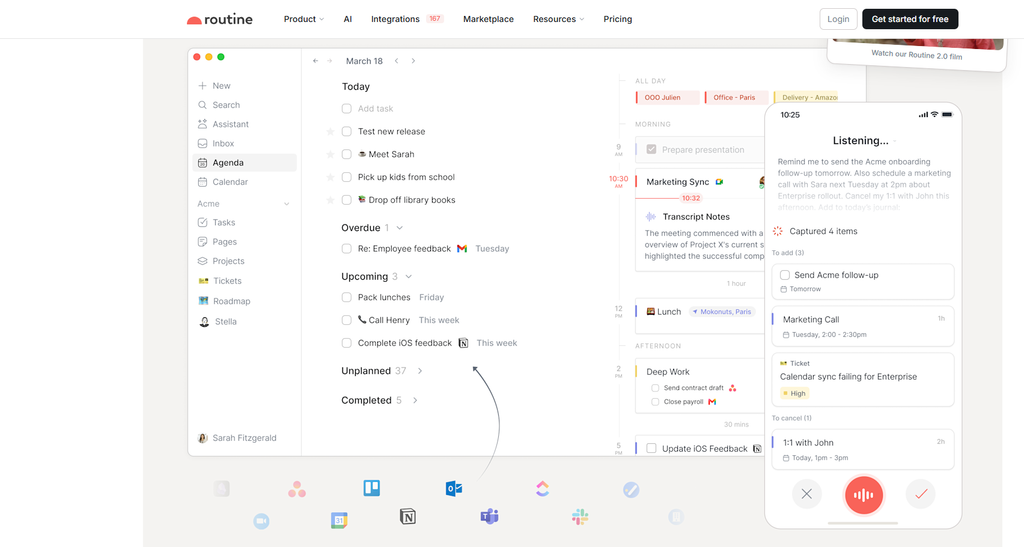
This Routine review looks at the all-in-one planner that refuses to make you choose between a task app, a calendar, and a notes app. Its bet is AI-native unification: one surface where tasks, events, notes, and AI agents live together, so a female creator stops app-hopping and starts delegating. If you’re a female creator who wants her scattered tools (Todoist + Google Calendar + Notion) collapsed into one calm, intelligent workspace, this productivity app for female creators is the alternative.
Routine is a cross-platform (macOS, Windows, iOS, Android, Web, Linux) productivity app built around one idea: stop running three apps to run your day. We ran it for a month on a real solo-creator workflow (a content business + an online course + a household) to see if the paid plan earns its place next to Akiflow, Sunsama, and Timestripe.
Routine review: bottom line
Routine is the AI-powered all-in-one planner: if you’re a female founder or creator who is drowning in separate task, calendar, and notes apps, its unified workspace + AI agents is the most consolidating option in this series. It is cheap (a real free plan, then 5/mo Personal** or **10/mo Professional) and it is AI-native, not AI-free — but it has no public API yet (webhooks and API are still “soon”), so if you want to build your own integrations today, this isn’t it.
Best for
- Throughout this Routine review, one use case kept standing out: female creators who want everything in one calm surface.
- Female founders & creators who juggle tasks + calendar + notes — Routine keeps them as one linked workspace; no app-hopping between Todoist, Google Calendar, and Notion.
- AI-delegation fans — the AI agents & automations turn “research this, summarize that meeting, file this” into background work you stop doing yourself.
- Voice-first capturers — the AI voice assistant captures tasks and reschedules your day hands-free, ideal when you’re walking or nursing a baby.
- Budget-conscious solos — a genuinely usable free plan (unlike Akiflow/Sunsama which are trial-only) and Personal at just $5/mo.
- People who like to customize the model — custom databases & types let you model clients, projects, and content as your own data, not someone else’s to-do list.
Not ideal if
- You want to build your own integrations today — Routine’s public API and webhooks are still “soon”; unlike Akiflow (2,000+ native integrations) and unlike tools with open REST, you can’t extend it yet.
- You want a calm, minimal ritual — Routine is a workspace OS, not a quiet daily-planning ceremony; Sunsama’s manual daily ritual is gentler if you want less surface area.
- You want pure time-blocking on a calendar — time blocking is a paid (Personal+) feature; Akiflow/Sunsama bake calendar sync into the core experience.
- You need serious PM at scale — teams get workspaces and access control only on the $15/seat Business plan; large orgs should compare ClickUp/Asana.
- You expect a tiny, indie maker — Routine is ambitious and fast-moving, which is exciting but means some features (API, webhooks, canvases) are still landing.
Real-world example
In the real-world part of this Routine review, meet Maya, a freelance brand designer. Before Routine her tasks lived in Todoist, her meetings in Google Calendar, and her client notes in Notion — three apps, three contexts, constant switching. Routine pulled them into one surface.
Her Routine setup after a month:
- Unified workspace — she keeps “Client A — Brand Kit”, “Course Launch”, and “Home” as linked projects with notes attached to each task.
- AI meeting notes caught the action items — a client call auto-summarized into three tasks, so nothing fell through the cracks.
- AI voice assistant — she dictates “move the deck to Friday afternoon” while walking, and Routine reschedules.
- Time blocking (Personal) — her deep-work blocks finally sit on the same screen as her tasks.
The cost: after a free month on the Free plan, $5/mo Personal** — where Akiflow is $192/yr and Sunsama is 204/yr, Routine's **60/yr is roughly a third of the price and includes AI voice. She didn’t cancel anything — Routine replaced Todoist + a notes app, and gave her AI meeting notes she didn’t know she needed. For a creator whose problem is tool sprawl, that math is a steal.
Team fit
| Use case | Fit |
| Solo female founder / creator wanting one calm surface | ⭐⭐⭐⭐⭐ ideal |
| AI-delegation fans (agents + automations) | ⭐⭐⭐⭐⭐ the differentiator |
| Voice-first capturers | ⭐⭐⭐⭐⭐ AI voice assistant |
| Budget-conscious solos | ⭐⭐⭐⭐⭐ free plan + $5/mo |
| Light collaboration (client/partner) | ⭐⭐⭐ shared projects, comments |
| Calendar time-blockers (Akiflow/Sunsama style) | ⭐⭐⭐ time blocking is paid (Personal+) |
| Developers wanting a public API | ⭐ none yet — API/webhooks “soon” |
| Agency / enterprise PM | ⭐⭐⭐ Business $15/seat for workspaces |
Pricing
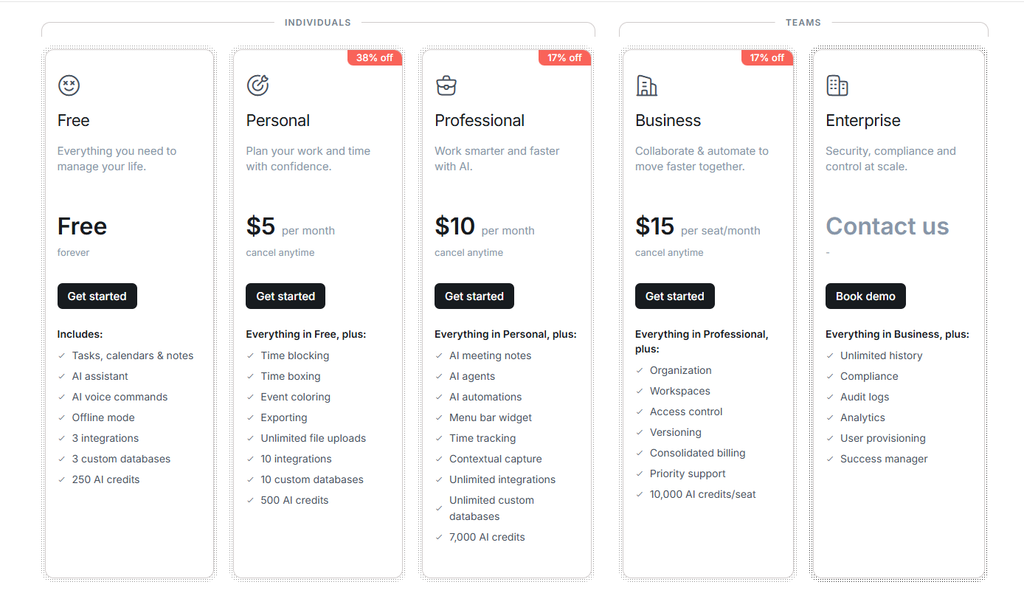
Free: Free forever — Tasks, calendars & notes, AI assistant, AI voice commands, offline mode, 3 integrations, 3 custom databases, 250 AI credits. Genuinely usable forever — a real free tier, unlike Akiflow/Sunsama’s trial-only model.
Personal: $5 per month — everything in Free, plus: time blocking, time boxing, event coloring, exporting, unlimited file uploads, 10 integrations, 10 custom databases, 500 AI credits.
Professional: $10 per month — everything in Personal, plus: AI meeting notes, AI agents, AI automations, menu bar widget, time tracking, contextual capture, unlimited integrations, unlimited custom databases, 7,000 AI credits.
Business: $15 per seat/month — everything in Professional, plus: organization, workspaces, access control, versioning, consolidated billing, priority support, 10,000 AI credits/seat. Enterprise is contact-sales.
Verdict on price: Routine is among the cheapest AI planners we’ve reviewed. At 60/yr Personal** or **120/yr Professional, it undercuts Akiflow (192/yr) and Sunsama (204/yr) while including AI agents. You pay for consolidation + AI, not for a stripped-down minimalist.
What you get in Routine (Professional)
Routine ships a broad, opinionated set of features — more integration and AI breadth than Akiflow in some respects, and a uniquely consolidating experience:
- Unified workspace (tasks + calendar + notes) — one screen for everything; the signature “all-in-one planner” promise.
- AI voice assistant — command Routine by voice: create tasks, plan meetings, reschedule, take notes on the go.
- AI meeting notes — auto-transcribe and summarize meetings, turn action items into tasks, no meeting bot required.
- AI agents & automations — delegate research, data structuring, and repetitive ops to specialized AI agents.
- Custom databases & types — model customers, projects, and content as your own data (the “single source of truth” pitch).
- Time blocking & time boxing (Personal+) — protect deep-work blocks on the same screen as tasks.
- Integrations & MCP — connect Slack, Gmail, Dropbox and more; Routine supports the Model Context Protocol (MCP) so ChatGPT/Claude can talk to it.
- Cross-platform + offline — macOS, Windows, iOS, Android, Web, Linux, with offline mode.
Pros
- ✅ True all-in-one — tasks, calendar, notes, and databases in one surface; ends app-hopping.
- ✅ AI-native, not AI-free — voice assistant, meeting notes, agents, and automations are first-class, not bolt-ons.
- ✅ Real free plan + cheapest paid — Free forever; Personal just $5/mo.
- ✅ MCP-ready — works with ChatGPT/Claude via the Model Context Protocol.
- ✅ Custom data model — build your own types and databases; adapts to your workflow.
- ✅ Cross-platform + offline — every OS covered, works without internet.
- ✅ Consolidates teams too — workspaces, access control, and versioning on Business.
Cons
- ❌ No public API / webhooks yet — both are still “soon”; you can’t build custom integrations today.
- ❌ Time blocking is paid — the headline calendar feature sits behind Personal ($5/mo), not Free.
- ❌ Feature-rich = heavier — databases, views, canvases, and agents are powerful but add a learning curve versus a calm minimalist tool.
- ❌ AI credit caps — Free (250) / Personal (500) credits can constrain heavy AI use; Professional (7,000) is the realistic AI tier.
- ❌ Fast-moving, some “soon” — API, webhooks, canvases, SSO are still landing; longevity of every promise is a slightly higher risk.
- ❌ Business is per-seat $15 — team features get expensive versus flat solo tools.
Integrations that matter
- Calendar & apps — connect Slack, Gmail, Dropbox and more; bidirectional sync centralizes work.
- MCP (Model Context Protocol) — Routine explicitly supports MCP so external AI apps (ChatGPT, Claude) can read and act on your data.
- Mobile & desktop & web — runs natively on macOS, Windows, iOS, Android, Linux, and the browser, with offline mode.
- No public REST API yet — unlike Akiflow (Jira, Linear, Asana, GitHub, 2,000+), Routine has no open API; automations are in-product only for now.
- No developer webhooks yet — triggers for external services are still “soon.”
What Routine is built for
Routine is not a checklist and not a bare calendar — its own site frames it as “One App for Tasks, Calendar & Notes, Powered by AI.” Before you subscribe, here are the official application scenarios worth knowing:
- Capture everything — universal inbox centralizes tasks, messages, and notifications so you stop switching apps.
- Delegate to AI — AI voice assistant and AI agents handle remembering, organizing, and repetitive ops.
- Plan on one screen — planner and time blocking put tasks and events side by side.
- Model your own work — custom databases and types make Routine your “single source of truth.”
- Automate as you grow — AI automations and views build dashboards and workflows without leaving the app.
- Stay cross-platform — desktop, mobile, web, and offline keep your data everywhere.
The method behind it. Routine’s design rests on one principle: collapse the tool sprawl. For tool-fatigued creators, that consolidation — backed by AI that does the remembering — is the product. It is the opposite pole from the deliberately AI-free Aevo in this series.
Don’t just take our word for it. Routine publishes transparent pricing and real testimonials from operators (an Engineering Manager, a YC Partner, a CEO, a CTO) who switched from Todoist, Akiflow, Notion, ClickUp, and Asana. Its differentiators (unified workspace, AI agents, MCP) are documented on the site itself — verifiable and honest, if smaller-scale than the giants.
Verdict
Routine review verdict: For a female founder or creator whose real problem is tool sprawl, Routine is the most consolidating way to run a day: the unified workspace + AI agents is a genuinely better model than a flat to-do list or three disconnected apps.
At 5/mo Personal** or **10/mo Professional, it’s among the cheapest AI planners in this series, with a real free tier to start. The catch is scope: no public API yet, so it won’t let you build custom integrations the way Akiflow’s ecosystem does.
In the final call of this Routine review, start on the free plan, run one real project through its workspace for a month, and only upgrade to Personal if time blocking matters or to Professional if you want AI agents. If your pain is a quiet daily ritual, Sunsama is the gentler buy; if it’s tool sprawl plus AI help, Routine wins.
Explore further
- Lifestack Review 2026: Energy Planner for Female Creators?
- Superlist Review 2026: Tasks & Notes for Busy Female Creators?
- Sunsama Review 2026: The Calm Planner for Female Creators?
- Akiflow Review 2026: Time-Blocking Planner for Busy Female professionals?
- TickTick Review 2026: The Calm To-Do App for Busy Female Creators
- Todoist Review 2026: Best To-Do APP for Female Creators?
FAQ
These are the most common questions we answered during this Routine review
Is there a free Routine plan?
Yes — unlike Akiflow and Sunsama (trial-only), the routine free plan is a real free tier that’s usable forever: tasks, calendars, notes, AI assistant, AI voice commands, offline mode, 3 integrations, and 250 AI credits. Personal (5/mo) unlocks time blocking; Professional (10/mo) unlocks AI agents.
Does Routine have AI?
Yes — and it’s the point. Routine is an AI-powered planner: AI voice assistant, AI meeting notes, AI agents, and AI automations are core features, and it supports the Model Context Protocol (MCP) so ChatGPT and Claude can connect. This is the opposite pole from the deliberately AI-free Aevo in this series.
Routine vs Akiflow / Sunsama / Timestripe — which is better?
Routine wins on consolidation (tasks + calendar + notes in one) + AI agents + MCP + price (free, $5, $10). Akiflow wins on native integrations (2,000+ tools) and time-blocking depth. Sunsama wins on a calm manual daily ritual. Timestripe wins on long-term Horizon goal visualization. In head-to-head terms, a routine vs Sunsama matchup is consolidation-plus-AI versus a quiet ritual, and a routine vs Timestripe matchup is today’s unified workspace versus long-term Horizon goals. In the final call of this Routine review, choose Routine if your problem is tool sprawl, not a quiet ritual or a 5-year vision.
Does Routine sync with Google Calendar / Outlook?
It connects your calendar and apps (Slack, Gmail, Dropbox and more) with bidirectional sync, and supports MCP for AI apps. Time blocking is a paid (Personal+) feature, not the Free tier.
Is Routine good for teams?
Lightly to moderately. Business ($15/seat) adds workspaces, access control, versioning, and consolidated billing. There’s no public API or webhooks yet, and no deep PM features, so it’s a personal + light-collaboration OS, not a ClickUp/Asana replacement.
Why trust our software reviews
We test every tool hands-on as working creators — not just reading spec sheets.
Related reads
- Lifestack Review 2026: Energy Planner for Female Creators?
- Superlist Review 2026: Tasks & Notes for Busy Female Creators?
- Sunsama Review 2026: The Calm Planner for Female Creators?
- Akiflow Review 2026: Time-Blocking Planner for Busy Female professionals?
- TickTick Review 2026: The Calm To-Do App for Busy Female Creators
- Todoist Review 2026: Best To-Do APP for Female Creators?