Notion Review 2026: Best Workspace for Female Creators?
By HerYelle · Last updated on 2026-10-16 ·
Disclosure: HerYelle may earn a commission if you sign up through our links, at no extra cost to you. We only recommend tools we have tested ourselves.
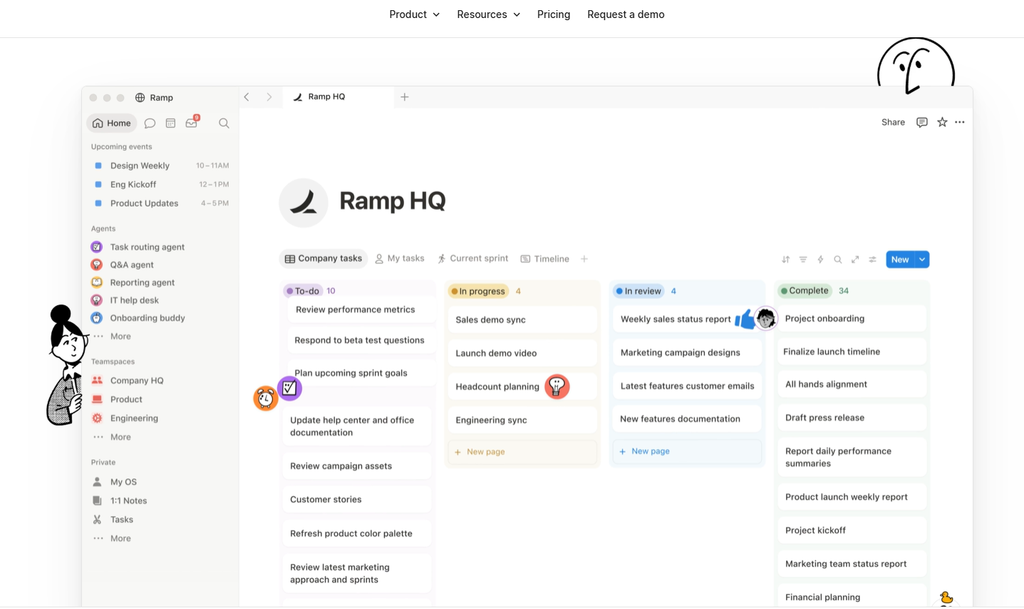
This notion review looks at the workspace that replaced a dozen open tabs for a generation of solo founders. Its bet is a block-based page you can bend into a second brain, a content calendar, or a client CRM. If you’re a female creator who drowns in scattered docs and half-finished ideas, this productivity app for female creators is the most flexible place to pull it together.
Notion is a US-based (San Francisco) app built around one idea: one customizable system for docs, databases, and now AI — instead of ten single-purpose tools. We ran it for a month on a real solo-creator workflow (a newsletter editorial calendar + a link-and-note second brain + a light client tracker) to see where the paid AI actually lives and whether Free is enough.
Notion review: bottom line
Notion is the best productivity app for female creators who want one flexible home for everything: its block + database model is the most customizable second brain in this series. It is genuinely free for individuals (unlimited pages and blocks forever) and it is AI-assisted, not AI-only — but here’s the catch we have to be honest about: the AI you came for (Notion Agent, AI Meeting Notes, Enterprise Search) is locked to the Business plan at $20/mo billed annually, so Free and Plus only get a taste. If you want cheap AI writing without the workspace lock-in, a standalone ChatGPT seat is simpler.
Best for
- Throughout this notion review, one use case kept standing out: creators who want a single, searchable home for scattered ideas.
- Female founders & creators who want a second brain — notion for content creators fits because databases + Ask Notion let you query your own notes semantically, not keyword-match them.
- Creators who plan content in batches — a content calendar template turns ideas, drafts, and publish dates into one filterable board.
- Solopreneurs running light client work — a CRM-ish database with statuses, assignments, and client pages, no extra tool.
- Budget-conscious solos — a real free plan for individuals with unlimited pages, blocks, and databases; no trial countdown.
- People who like to tinker — thousands of community templates mean you start from a setup, not a blank page.
Not ideal if
- You want AI on the cheap — full Notion AI (Agent, Meeting Notes, Enterprise Search) requires the Business plan ($20/mo annual); Free and Plus only get a capped trial of AI Core. A standalone ChatGPT seat is cheaper if writing is all you need.
- You want real relational database power — Notion’s databases are great for simple views but lack Airtable’s formula depth and scale.
- You want offline-first — the desktop app supports offline on selected pages, not a true local-first vault.
- You need hardcore project management — no Gantt, no cross-project dependencies; it’s a doc/db hybrid, not Jira.
- You want a fast native app — Notion is an Electron web shell; large workspaces can feel sluggish versus native apps.
- You worry about AI data retention — on Free/Plus/Business, LLM providers keep data 30 days; only Enterprise gets zero retention.
Real-world example
Notion real usage tutorial: build an anti-procrastination system
Here’s the part of this notion review you can copy today. The core idea is why “trying harder” backfires: you set goals at night, wake up anxious, and quit by day three — not because your willpower is weak, but because you used a goal intention without an implementation intention (psychologist Peter Gollwitzer’s distinction). Notion is the cheapest place to build implementation intentions, because every page can hold a trigger, an evidence rule, and a restart point. Below, we turn that four-lever method into a Notion setup you can clone in ten minutes — the most hands-on build in this notion review.
Lever 1 — Situation trigger (Task + Evidence + Situation). A plain to-do list never tells your brain when to start, so you stall. In Notion, build an Implementation Intentions database with four properties: Task, Evidence (how you’ll know it’s done), Situation (the exact cue), and Status. Fill it with the formula “I will [Task], proven by [Evidence], starting [Situation].” Example: “Finish The Almanack of Naval Ravikant, proven by a written review, starting tomorrow right after breakfast.” The Situation field is the whole point — it removes the “where do I begin?” paralysis.
Lever 2 — Interruption restart. Life interrupts: a call, a client, a sick kid. The trap is letting one break become the excuse to abandon the goal, then overcompensating the next day (which guarantees you quit). In Notion, add a Restart callout or a Next action field to every project page. When interrupted, spend 30 seconds logging why you stopped and the single next step — so you reopen a page that already knows where you are, instead of a blank one. Habits take 18–254 days to form; what matters is the easy re-entry, not the perfect streak.
Lever 3 — Action friction reduction. Most tasks die in the prep: before you “write the report” you must find the file, dig through chat history, and pick a template — and your attention is gone before you start. The night before, use a Notion Prep tonight checklist to drop the template, data, and references into one page. Then break the task into ordered checkboxes (Confirm data → Fill table → Check result) and save after each so you can see progress. Close the extra tabs, put the phone in another room, and open Notion’s focus mode. As this notion review keeps showing, fewer pre-steps means an easier start.
Lever 4 — Within capacity (beat projection bias). As this notion review keeps stressing, we predict future-us using today’s mood and underestimate how much state changes — so a “1-hour worksheet” becomes 3 hours and you want to quit. When that happens, lower the target, don’t abandon it. In Notion this is trivial: duplicate the project page and scale the goal down. Example: “Ship the game on the platform today” → “Study the basic gameplay loop today.” You’re still on the original path, just at a pace reality allows.
Recreate the “All-in-One Life OS Action Desktop” inside Notion (free). The method’s creator built a separate “All-in-One Life OS” with four functions: an action log, a focus timer, a prep area, and a “next-time recycle bin.” You don’t need a new app — a single Notion dashboard with four linked views does the same: a log database, a Pomodoro timer (use the built-in clock or an embed), a prep checklist, and a recycle-bin page for interrupted tasks waiting to restart. This notion review‘s preference is to keep everything in one free workspace, so your anti-procrastination system lives next to the notes you already keep.
In the real-world part of this notion review, meet Sara, a part-time food blogger and newsletter writer. Before Notion her recipes lived in screenshots, her pitch drafts in Google Docs, and her sponsor list in a Notes app — nothing talked to each other. The all-in-one workspace pulled it into one surface. For a specific Free template, you can refer to this guids.
Team fit
| Use case | Fit |
| Solo female creator wanting a second brain | ⭐⭐⭐⭐⭐ ideal (Free is enough) |
| Content planner / editorial calendar | ⭐⭐⭐⭐⭐ databases + filters |
| Light client/CRM work | ⭐⭐⭐⭐ Plus unlocks custom forms/sites |
| AI Agent + Meeting Notes user | ⭐⭐⭐⭐⭐ Business only |
| Hardcore relational database | ⭐⭐ Airtable better |
| Offline-first / local-first notes | ⭐⭐ Obsidian better |
| Fast native desktop app | ⭐⭐ Electron can lag |
| Enterprise security (SSO, audit) | ⭐⭐⭐⭐ Enterprise |
Pricing
Free: $0 forever per individual — unlimited pages, blocks, and databases; 5MB file uploads (per file); 7-day page history; 10 guests; Trial of Notion AI Core; basic forms & sites; Notion Calendar; unlimited collaborative blocks. Genuinely usable for one person forever.
Plus: 10$/month. Everything in Free, plus custom forms & sites, unlimited charts, unlimited file uploads, 30-day page history, and basic connections (Slack, Google Drive). Still only a trial of Notion AI.
Business: 20$/month — this is where AI actually lives. Notion Agent, AI Meeting Notes, Enterprise Search (Beta), SAML SSO, granular database permissions, private teamspaces, premium connections (GitHub, Asana, Salesforce). Recommended tier for AI users.
Enterprise: Custom quote — zero data retention with LLM providers, SCIM provisioning, audit log, advanced security & DLP/SIEM connections, customer success manager.
Custom Agents / Workers: $10 per 1,000 monthly Notion credits, metered on top of Business or Enterprise seats (no rollover). Standard AI Agents and Ask Notion stay included in the flat Business seat; only Custom Agents, Workers, and premium models draw credits.
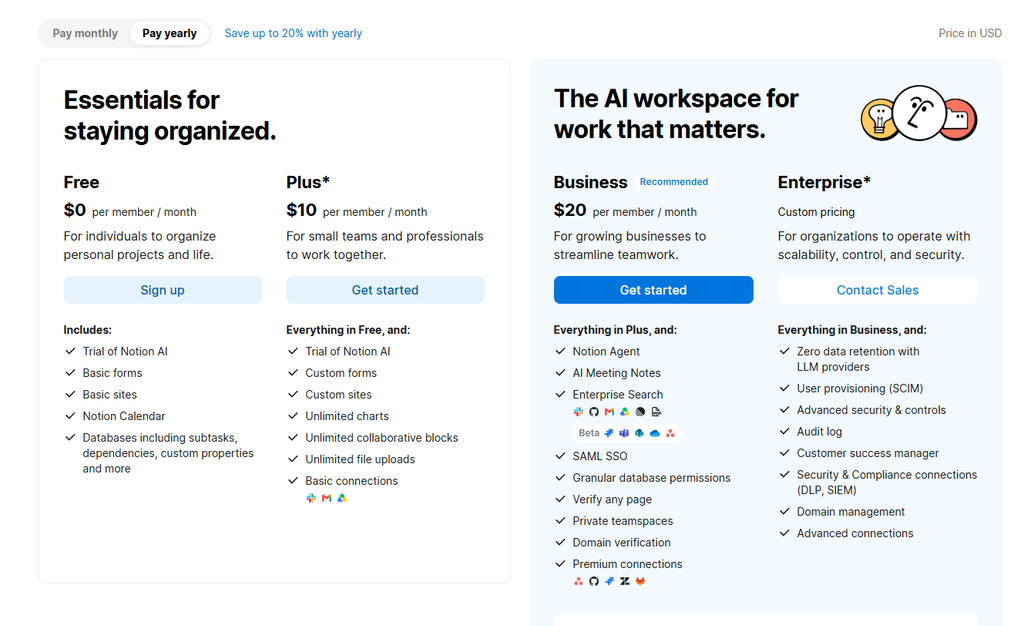
Verdict on price: Notion Free is the most generous individual free tier in this series — unlimited pages and blocks beat Akiflow/Sunsama’s trials outright. On the notion ai credits question, the headline is simple: the AI suite is a Business upsell, not a cheap bolt-on. If you only need chat-based help, Free’s trial plus a $20 ChatGPT seat beats paying $20/mo for a whole Notion seat you don’t need. You pay for flexibility + collaboration + AI together, not for any one feature.
What you get in Notion
Notion ships a deep, bend-it-yourself toolkit — none of Canva’s design focus, but a uniquely block-and-database canvas we leaned on throughout this notion review:
- Blocks & pages — every piece of content (text, to-do, table, embed) is a block you drag and nest.
- Databases — tables, boards, calendars, galleries, timelines, with custom properties, filters, and charts.
- Templates — thousands of free community setups for work and life, so you start from structure.
- Notion AI (notion ai) — Ask Notion (semantic search + citations), draft/edit, autofill databases; Agent + Meeting Notes + Enterprise Search on Business.
- Notion Calendar & Forms & Sites — calendar sync, forms (custom on Plus+), and web-published sites (SEO indexing on paid).
- Automations & API — buttons, database automations, public API, webhooks, and the new Workers (code-extended agents, credit-metered).
- Integrations — Slack, Google Drive, GitHub, Jira, MS Teams, SharePoint, OneDrive, Gmail, Linear, Salesforce, Box, Zapier.
Pros
- ✅ Real free plan for individuals — unlimited pages, blocks, and databases, no trial clock.
- ✅ Unmatched flexibility — one workspace becomes a wiki, CRM, calendar, or site.
- ✅ Strong second-brain search — Ask Notion reads and cites across your own pages and connected apps.
- ✅ Thousands of templates — start from a setup, not a blank page.
- ✅ AI bundled into Business — Agent + Meeting Notes + Enterprise Search at $20/mo annual.
- ✅ Huge ecosystem & social proof — 100M+ users, 62% of Fortune 100, G2 #1 knowledge base 3 years running.
- ✅ Collaboration & permissions — granular database row access, teamspaces, guest sharing.
Cons
- ❌ AI locked to Business ($20/mo) — Free/Plus get only a capped AI Core trial; no cheap add-on.
- ❌ Metered Custom Agent credits — $10/1,000 credits on top of seats; unpredictable for heavy automation.
- ❌ Not a real database — lacks Airtable’s formula depth and scale for complex relational work.
- ❌ Offline is limited — not a local-first vault like Obsidian.
- ❌ Electron app can lag — large workspaces feel slow versus native apps.
- ❌ AI data retention on lower tiers — 30-day LLM retention until Enterprise.
Integrations that matter
- Slack & Google Drive — the two most-used connections; sync messages and files into pages.
- GitHub, Jira, Linear, Asana, Salesforce, Box — project and CRM data surfaces inside Notion (premium connections on Business+).
- Zapier & Webhooks & Public API — build bespoke automations and push real-time updates to external tools.
- Notion Calendar / Forms / Sites — keep time, intake, and web publishing inside one workspace.
- Workers (Beta) — run custom code to extend agents and sync external data; credit-metered.
What Notion is built for
Notion is not a note app and not a project app — its own site frames it as the AI workspace where teams and agents ship together. Before you subscribe, here are the official application scenarios worth knowing:
- Wiki & docs — a single source of truth for team and personal knowledge.
- Projects — roadmaps, sprints, and status tracking with databases.
- AI Meeting Notes — auto-transcribe and summarize calls, no bot needed (Business+).
- Enterprise Search — one search across Slack, GitHub, Drive, and more (Business+).
- Websites & forms — publish pages to the web and capture responses with forms.
- Custom Agents — autonomous bots that run scheduled, multi-step work across your workspace.
- Second brain — Ask Notion finds answers with citations from your own content.
The method behind it. Notion rests on one principle: customize one tool to work the way you do, instead of adopting ten. For creators drowning in scattered context, that consolidation is the product. This notion review maps each scenario to a real creator workflow above.
Don’t just take our word for it. Notion is used by 100M+ people and 62% of Fortune 100; its differentiators (block flexibility, Ask Notion, bundled AI on Business) are documented on the site itself rather than via third-party ratings — verifiable and honest, though the AI tier gate is the one caveat we flag loudly.
Verdict
notion review verdict: For a female founder or creator whose real problem is scattered context — ideas in screenshots, drafts in docs, clients in a notes app — Notion is the most flexible way to consolidate: its block + database model is genuinely better than a flat folder of docs, and Free is enough to start a real second brain today.
At $20/mo annual (Business), it’s the best value in this series only if you actually use the AI Agent and Meeting Notes — otherwise Free plus a standalone ChatGPT seat is cheaper and less locked-in. The catch is the AI gate: on Free and Plus you get a taste, not the toolkit, and Custom Agents add a metered credit line on top.
In the final call of this notion review, start on the free plan, build one real second-brain and one editorial calendar through it this month, and only upgrade to Business if the Agent or Meeting Notes save you more than $20/mo — or you collaborate with a team. If your job is hardcore relational data, Airtable wins; if it’s local-first privacy, Obsidian wins; if it’s scattered context in one flexible home, Notion wins.
Explore further
- Routine Review 2026: Best AI Planner for Female Creators?
- Lifestack Review 2026: Energy Planner for Female Creators?
- Superlist Review 2026: Tasks & Notes for Busy Female Creators?
- Sunsama Review 2026: The Calm Planner for Female Creators?
- Akiflow Review 2026: Time-Blocking Planner for Busy Female professionals?
- TickTick Review 2026: The Calm To-Do App for Busy Female Creators
- Todoist Review 2026: Best To-Do APP for Female Creators?
FAQ
Is there a free Notion plan?
Yes — the notion free plan is a real free tier usable forever for individuals: unlimited pages, blocks, and databases, 7-day page history, basic forms/sites, and a Trial of Notion AI Core. Paid plans unlock AI fully and team features.
Does Notion have AI?
Yes — notion ai spans Ask Notion, draft/edit, and (on Business) the Notion Agent, AI Meeting Notes, and Enterprise Search. But the full suite is bundled into Business; Free and Plus get only a capped trial of AI Core. There is no cheap per-user AI add-on anymore.
Notion vs Evernote / Obsidian / OneNote — which is better?
Notion wins on flexibility, templates, and databases; Obsidian wins on local-first privacy and a free personal vault; Evernote wins on fast, simple note capture; OneNote wins on being free inside Microsoft 365. If you want one customizable system, Notion; if you want private markdown files, Obsidian.
Why trust our software reviews
We test every tool hands-on as working creators — not just reading spec sheets. For our full process.