Lifestack Review 2026: Energy Planner for Female Creators?
By HerYelle · Last updated on September 24, 2026 ·
Disclosure: HerYelle may earn a commission if you sign up through our links, at no extra cost to you. We only recommend tools we have tested ourselves.
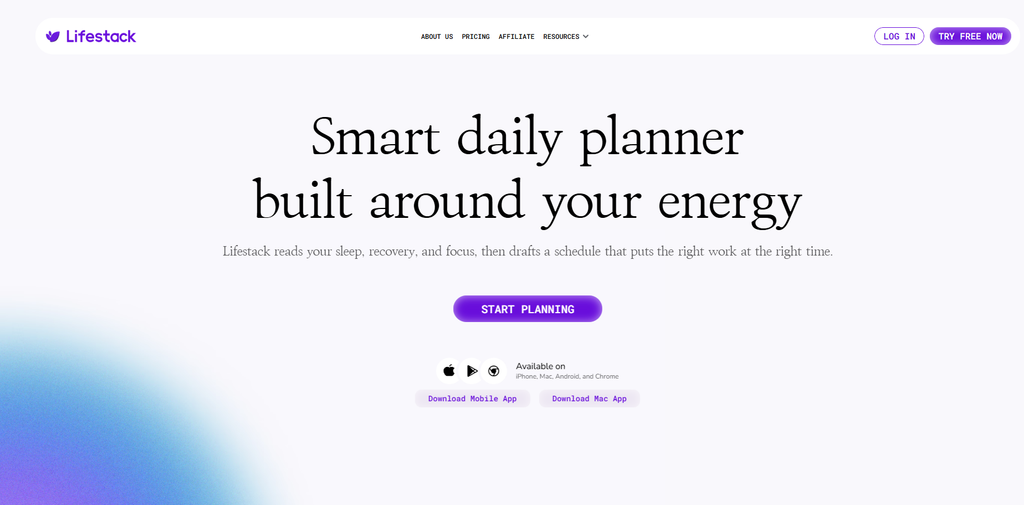
In this Lifestack review, we look at the planner that schedules around your body, not your calendar’s empty slots. Its bet is energy-awareness: it reads your sleep, recovery, and focus (from a wearable or Apple Health) and slots demanding work into your real peak-energy windows, marked on the calendar as Energy Zones. If you’re a female creator who burns her sharpest hours on low-value busywork and then pushes through the afternoon on fumes, this is the planner that finally respects your biology.
Lifestack is a US-based productivity app built around one idea: stop planning against a uniform day and start planning against your actual energy. We ran it for a month on a real solo-creator workflow (a content business + an online course + a household) to see if the paid plan earns its place next to Akiflow, Sunsama, Timestripe, Aevo, and Superlist.
Lifestack review: bottom line
Lifestack is the energy-aware AI planner: if you’re a female founder or creator who wants her hardest work to land when she’s sharpest — and her admin to land when she’s foggy — its Energy Zones + wearable insights is the most biologically honest option in this series. It is cheap (Annual 50/year**, or a **120 lifetime) and it is AI-driven, not AI-free — but it has no calendar time-blocking, no public API, and lighter team features than Akiflow, so if you want a two-way sync power hub, this isn’t it. For the exact numbers, see our Lifestack pricing 2026 breakdown below: the Lifestack free plan (a 7-day trial, no permanent free tier) is the cheapest way in, and the Lifestack lifetime deal ($120 one-time) undercuts every subscription in this series.
Best for
- Female creators & founders with non-uniform energy — ADHD, chronic fatigue, perimenopause, or just honest peaks and dips; Energy Zones put deep work where you actually have it.
- People who already wear a tracker — Oura, Apple Watch, Garmin, Whoop; the wearable insight view puts HRV/sleep/recovery next to your calendar instead of in a separate fitness app.
- People who want data-backed scheduling — if you’ve ever discovered your “real peak” is 10am–12pm only after seeing it on a chart, Energy Zones turn that insight into a daily system.
- Anyone tired of “uniform-capacity” planners — Lifestack is the only tool in this series that plans meals and rest alongside tasks, so the trade-offs are visible before you make them.
- People who respond to energy archetypes — one user described herself as a “morning rocket” and moved workouts/admin to the dip, reclaiming ~2 hours of effective time per day.
- Budget-conscious solos — Annual at **
50/year** (~4.17/mo) is among the cheapest paid plans in this series, and there’s a $120 lifetime that beats every subscription long-term. - People who want a calm AI copilot — “Chat with Lifestack” is a 24/7 conversational assistant that carries the full day’s context for in-the-moment decisions.
Not ideal if
- You want two-way calendar time-blocking — Lifestack shows energy zones on a time rail and syncs Google/Apple Calendar, but it is not the drag-to-calendar auto-scheduler Akiflow/Sunsama are. If you want the app to build your calendar blocks, look at Akiflow.
- You want deep integrations + public API — it syncs Google/Apple Calendar and pulls tasks from Trello-class apps, but there’s no documented public REST API and no MCP. Akiflow’s 2,000+ connector catalog is in another league.
- You need serious project / team management — no Gantt, no workload views, no PM-grade reporting; it’s a personal + light-collaboration planner.
- You expect a big free tier — the official pricing page (verified 2026-09-24) lists only Monthly $7 / Annual $50 / Lifetime $120; a free tier is mentioned by third-party aggregators but not shown on the official page, so don’t count on it.
- You don’t wear a tracker and won’t — Lifestack works without one (you can rate your own energy), but the wearable insight is the headline feature; you’d be buying 60% of the value.
Real-world example
Nora, a freelance UX writer with ADHD (Austin-based). Before Lifestack her sharp 9–11am routinely went to inbox zero and client admin, while her hardest course-script writing got shoved to a 3pm slump. After a month with a wearable connected, her Lifestack setup:
- Energy Zones did the heavy lifting — Lifestack read her Oura sleep score and flagged a high-energy morning, so it auto-slotted the course script draft there and moved admin to her post-lunch dip.
- Wearable insight view — HRV and recovery showed directly beside her calendar; on a low-recovery day the app quietly pushed deep work later instead of her forcing it.
- Meals & rest planned in — the AI mapped a lighter lunch and a 20-minute walk before a big client call, so she wasn’t foggy on the zoom.
- Chat with Lifestack caught a reschedule — mid-morning she asked “move the edit to tomorrow, I’m behind?” and it re-drafted the day around her remaining energy without her rebuilding it.
- The hidden win: routine reordering — seeing she was a “morning rocket,” Nora moved her workout from 6pm (when she was drained) to 8:30am (when she had spare capacity). It cost no extra willpower; it just matched the shape of her day.
The cost: Annual 50/year** (4.17/mo) — where Akiflow is $192 and Sunsama is $204, and TickTick Premium is $49.99. She skipped the free-tier question (official page shows no free plan) and went straight to Annual because the energy-aware scheduling replaced a $0 notes app and a 0 calendar — and gave her the "work-with-my-body" structure no other tool in this series offers. She'd buy the **120 lifetime plan the moment she’s sure she’ll keep using this App.
Team fit
| Use case | Fit |
| Solo female founder / creator with variable energy | ⭐⭐⭐⭐⭐ ideal |
| ADHD / non-uniform-capacity brains | ⭐⭐⭐⭐⭐ the only tool built for this |
| Wearable users (Oura/Apple/Garmin/Whoop) | ⭐⭐⭐⭐⭐ wearable insight is the headline |
| Budget-conscious solos | ⭐⭐⭐⭐⭐ $50/yr Annual or $120 lifetime |
| Calm AI copilot users | ⭐⭐⭐⭐⭐ 24/7 contextual chat |
| Calendar time-blockers (Akiflow/Sunsama style) | ⭐⭐ energy rail, not drag-to-block |
| Deep-integration / API power users | ⭐⭐ limited — no public API, no MCP |
| Agency / enterprise PM | ⭐ limited — no Gantt, no PM features |
Lifestack pricing 2026
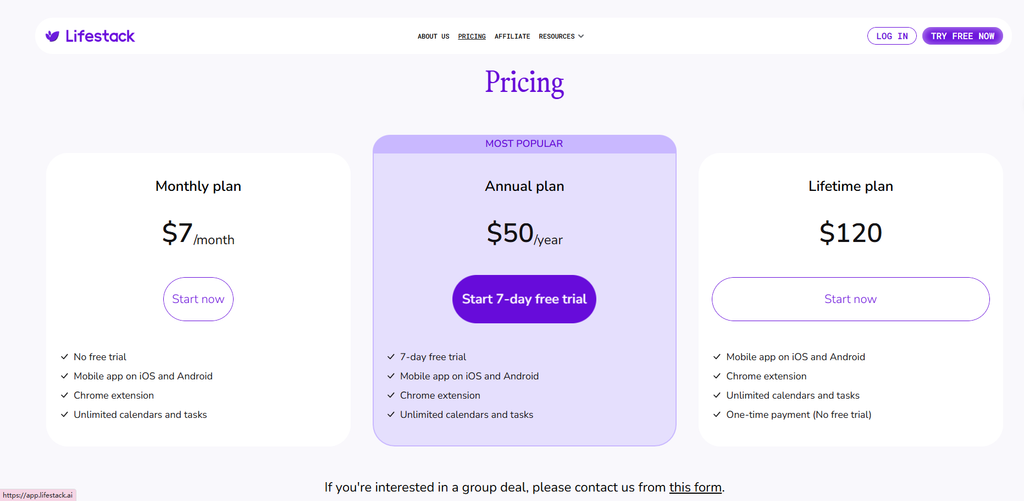
Monthly: $7/month — no free trial. Everything below, billed month-to-month.
Annual: **$50/year** (≈ $4.17/month effective) — includes a 7-day free trial. The best value if you’re unsure.
Lifetime: $120 one-time — no trial, but the cheapest per-year once you pass ~2.4 years. Rare for a health-data product.
Verdict on price: LifeStack is one of the cheapest paid planners we’ve reviewed — Annual 50/year** costs roughly the **same as TickTick Premium (49.99/yr), ~0.83× Todoist Pro (60/yr), ~0.93× Aevo (~54/yr), ~0.46× Timestripe (108/yr), and about **one-quarter** of Akiflow (192/yr) and Sunsama (204/yr). The **120 lifetime plan** , You pay for energy-aware AI scheduling + wearable insight, not for integrations or PM depth.
What you get in Lifestack (all paid plans)
LifeStack ships a focused, opinionated set of features — less integration breadth than Akiflow, but a uniquely biological planning experience:
- Energy Zones — the signature feature: demanding work is aligned with your peak-energy windows and marked on the calendar; low-value work slides to your dip.
- Wearable Insights — reads sleep, recovery, HRV, and focus from Oura, Apple Watch, Garmin, Whoop via Apple Health; health data shown directly beside your calendar. This is what makes LifeStack a genuine wearable planner, not just another to-do app.
- Meals & Sleep AI planning — the AI maps meals and rest around today’s demands so energy trade-offs are visible before you make them.
- Chat with Lifestack — a 24/7 conversational copilot that carries the full day’s context for adaptive, in-the-moment decisions.
- Calendar & task sync — Google Calendar + Apple Calendar two-way sync; pulls tasks from Trello-class apps and overlays them with the same energy zones.
- Cross-platform — iPhone, Android, Mac, Chrome extension, and web (app.lifestack.ai); unlimited calendars and tasks on every plan.
- Privacy by design — health and calendar data is stated to never be sold or shared; security standards “trusted by professionals and institutions.”
Pros
- ✅ Genuinely unique: energy-aware scheduling — the only tool in this series that plans around your body, not uniform day-capacity.
- ✅ Wearable integration done right — Oura/Apple/Garmin/Whoop data sits next to your calendar, not in a silo.
- ✅ Built for ADHD explicitly — treats the intention-vs-executive-capacity gap as the core problem, not an afterthought.
- ✅ Cheap + lifetime option — $50/yr Annual or $120 lifetime; beats every subscription long-term.
- ✅ Calm AI copilot — 24/7 contextual chat without the “AI runs your day” anxiety.
- ✅ Privacy-first — health/calendar data never sold or shared.
Cons
- ❌ No real free tier (officially) — pricing page shows trial-only; aggregators claim free but it’s unverified.
- ❌ Thin integrations, no API — Google/Apple Calendar + Trello-class task pull, but no public REST API and no MCP.
- ❌ Not a time-blocking / auto-scheduling tool — energy rail + sync, not the two-way drag-to-calendar of Akiflow/Sunsama.
- ❌ Light team features — no Gantt, no workload views, no PM-grade reporting.
- ❌ Smaller maker / less third-party content — fewer templates and community resources than the Notion-adjacent giants.
- ❌ Needs a wearable for full value — works without one (self-rated energy), but you’d be buying ~60% of the pitch.
Integrations that matter
- Calendar (Google Calendar + Apple Calendar) — two-way sync; covers most calendar apps.
- Wearable (Oura / Apple Watch / Garmin / Whoop via Apple Health) — sleep, recovery, HRV, focus signals feed Energy Zones.
- Task import (Trello-class apps) — third-party tasks sync in and share the same energy-zone overlay.
- No PM / dev integrations — unlike Akiflow (Jira, Linear, Asana, GitHub, 2,000+), there are no native project-tool connections.
- No automation layer — no MCP, no public REST API — automation is not a LifeStack strength.
What Lifestack is built for
LifeStack is not a calendar and not a checklist — its own site frames it as “the daily planner that schedules around your body rather than around your calendar’s empty slots.” Before you subscribe, here are the official application scenarios worth knowing:
- Energy Zones — align demanding work with your peak-energy windows for maximum productivity.
- Wearable Insights — see your health data in context, integrated directly with your calendar and plans.
- Meals & Sleep — start every morning with a balanced plan; AI has already mapped your meals and rest around today’s demands.
- Chat with Lifestack — your 24/7 copilot for daily decisions, always in context, always adaptive.
- Privacy First — your health and calendar data stays private; never sold, never shared.
The method behind it. LifeStack’s design rests on one principle: true productivity starts with your body, not just your calendar. For creators whose sharpest hours get wasted on busywork, that reframe is the product.
Don’t just take our word for it. LifeStack reports 50,000+ users and publishes verbatim customer stories (Michael Rooks, Dave Miller, Kirtis Siemens) on its site — smaller-scale social proof than the Notion-adjacent giants, but verifiable and honest.
Verdict
Lifestack review verdict: For a female founder or creator whose real problem is running her sharpest hours into the ground, LifeStack is the most biologically honest planner in this series: Energy Zones + wearable insight is a genuinely better model than a flat to-do list, and at $50/year Annual (or $120 lifetime plan) it’s among the cheapest. The catch is scope: no public API, no MCP, no deep PM features, and no real free tier — so it won’t become your integration hub the way Akiflow does. Start on the Annual plan (7-day trial), connect a wearable, and run one real week through its Energy Zones; only buy the lifetime if the body-aware scheduling is worth more than the $50/year it costs. In head-to-head terms, a Lifestack vs Akiflow or Lifestack vs Sunsama matchup comes down to energy-aware scheduling + price versus integrations + time-blocking, and a Lifestack vs Timestripe matchup is energy-now versus long-term vision. If your pain is calendar chaos, Akiflow or Sunsama is the better buy; if it’s energy chaos, LifeStack wins. Just keep expectations realistic: it’s an energy-aware overlay, not a body autopilot.
Explore further
- Superlist Review 2026: Tasks & Notes for Busy Female Creators?
- Sunsama Review 2026: The Calm Planner for Female Creators?
- Akiflow Review 2026: Time-Blocking Planner for Busy Female professionals?
- TickTick Review 2026: The Calm To-Do App for Busy Female Creators
- Todoist Review 2026: Best To-Do APP for Female Creators?
FAQ
Is there a free Lifestack plan?
The official pricing page (verified 2026-09-24) lists only Monthly $7, Annual $50, and Lifetime $120 — no permanent free tier is shown. Third-party aggregators claim a free plan exists, but we follow the official page in this series and treat LifeStack as trial-only. The Annual plan includes a 7-day free trial.
Does Lifestack have AI?
Yes — and it’s the point. LifeStack is an AI planner for ADHD and, more broadly, an energy-aware AI planner: it reads your sleep/recovery/focus (from a wearable or Apple Health) and drafts a schedule that puts hard work at your peak. Its “Chat with Lifestack” is a 24/7 contextual copilot. This is the opposite pole from the deliberately AI-free Aevo in this series.
Lifestack vs Akiflow / Sunsama / Timestripe / Aevo — which is better?
LifeStack wins on energy-aware scheduling + wearable insight + ADHD focus + price ($50/yr or $120 lifetime). Akiflow wins on integrations (2,000+ tools) and time-blocking + Aki AI. Sunsama wins on a calm manual daily ritual + native calendar sync. Timestripe wins on long-term Horizon goal visualization. Aevo wins on being deliberately AI-free + EU privacy. Choose LifeStack if your problem is energy chaos, not calendar chaos or 5-year vision.
Does Lifestack sync with Google Calendar / Outlook?
It syncs Google Calendar and Apple Calendar (two-way), which covers most calendar apps. Outlook sync is not a stated integration. It’s an energy rail + sync, not the two-way drag-to-calendar time blocking of Akiflow/Sunsama.
Is Lifestack good for teams?
Lightly. It’s a personal + light-collaboration planner; there’s no Gantt, no public API, and no deep PM features. If you need agency/enterprise PM, none of the tools in this series fit — look at Asana/Monday/ClickUp.
Why trust our software reviews
We test every tool hands-on as working creators — not just reading spec sheets.
Related reads
- Superlist Review 2026: Tasks & Notes for Busy Female Creators?
- Sunsama Review 2026: The Calm Planner for Female Creators?
- Akiflow Review 2026: Time-Blocking Planner for Busy Female professionals?
- TickTick Review 2026: The Calm To-Do App for Busy Female Creators
- Todoist Review 2026: Best To-Do APP for Female Creators?