Superlist Review 2026: Tasks & Notes for Busy Female Creators?
By HerYelle · Last updated on September 23, 2026
Disclosure: HerYelle may earn a commission if you sign up through our links, at no extra cost to you. We only recommend tools we have tested ourselves.
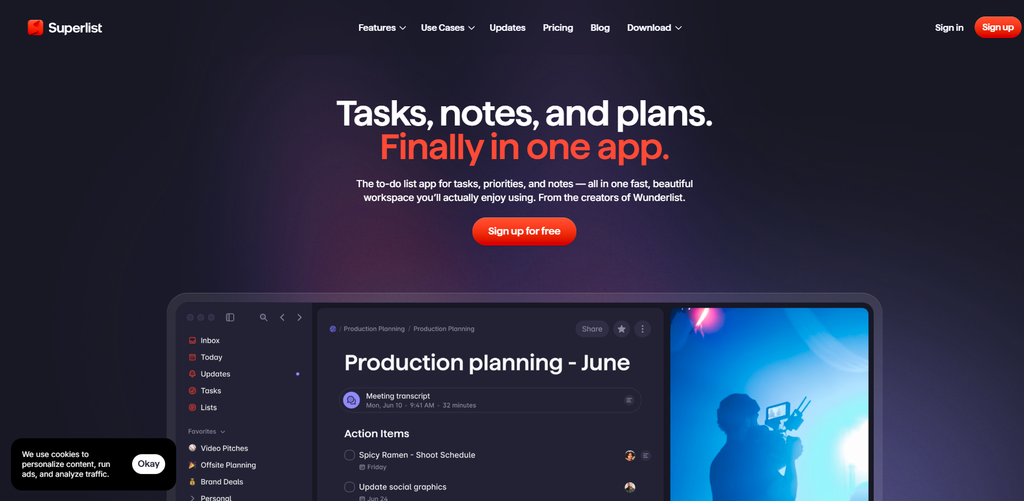
In this Superlist review, we look at the planner with the strongest pedigree in the category: it’s built by the makers of Wunderlist, the to-do app a generation of users still mourns. Its bet is unification — tasks, notes, and plans in one fast workspace — plus AI that turns your voice and meetings into action items instead of another app to babysit. If you’re a female creator who wants one beautiful place for both your doing and your thinking, and doesn’t mind a little AI help, this is the Wunderlist spiritual successor.
Superlist is a US-based productivity app built around one idea: stop organizing your tools and start doing your work. We ran it for a month on a real solo-creator workflow (a content business + an online course + a household) to see if the paid plan earns its place next to Akiflow, Sunsama, Timestripe, and Aevo.
Superlist review: bottom line
Superlist is the unified tasks + notes planner with AI assist: if you’re a female founder or creator who wants tasks, project notes, and plans side by side — and likes AI that captures voice memos and meeting notes for you — its one-workspace + nested lists + Voice AI is the most enjoyable option in this series. It is cheap (a real Free plan, Basic at $5/month or $59/year, and Super at $21/month or $249/year) and it is AI-assisted, not AI-run — but it has no calendar time-blocking and lighter PM depth than Akiflow, so if you want an auto-scheduling agent, this isn’t it.
Best for
- Female founders & creators who want one calm workspace — tasks, notes, and plans live in the same fast app; no second notes app and no Wunderlist-shaped hole.
- People who think out loud — Voice AI (Talk) turns “Dentist Friday at 2pm” or a spoken brain-dump into tasks; on Super, AI Meeting Notes and AI Chat capture and summarize your calls.
- Wunderlist refugees — the same “simple but beautiful” DNA, now with nesting, collaboration, and AI the original never had.
- Light teams / client work — real-time collaboration, shared lists, and guests (up to 5 people on Free, unlimited on paid).
- Budget-conscious solos — a real free tier (unlike Akiflow/Sunsama trial-only) and Basic at **
5/month** (59/year) — about the same as Todoist Pro.
Not ideal if
- You want AI to auto-run your day — Superlist assists (voice → tasks, meeting summaries) but it is not an agentic scheduler like Akiflow’s Aki. If you want the app to build your calendar, look elsewhere.
- You want drag-to-calendar time blocking — Superlist is a task/notes workspace, not a time-blocker like Akiflow/Sunsama; there’s no “block this on my calendar” flow.
- You want deep, named integrations + public API — pricing says “all integrations” unlock on Basic, but it doesn’t publish the 2,000+ connector catalog Akiflow does, and there’s no documented public REST API. Treat integrations as “the usual suspects,” not a power hub.
- You need serious project management — infinitely nested lists are great for personal/light-team structure, but there’s no Gantt, no workload views, no PM-grade reporting.
- You expect a big free tier — Free is capped at 5 lists and 5 people; TickTick’s free plan is more generous for pure personal use.
Real-world example
Lena, a solo content creator + online-course maker (Lisbon-based). Before Superlist her scripts lived in a notes app, her publish checklist in a to-do app, and her course modules in a third place — three tools, three places things drifted. Superlist pulled them into one surface.
Her Superlist setup after a month:
- Tasks + notes in one — the “Q4 launch” task carries the full script draft and shot list as attached notes, so she never swaps apps mid-recording.
- Infinitely nested lists — “Online course” broke into modules → lessons → sub-lessons, each with a checkbox; the course never felt monolithic.
- Voice AI (Basic) caught a thought — a walk-time voice memo (“email the brand sponsor about the affiliate slot”) became a task with the right date before she got home.
- AI Meeting Notes (Super) — a 30-minute call with her editor auto-summarized into action items on the board, so follow-ups didn’t live only in her memory.
The cost: after a free month on the Free plan, Basic is 5/month (59/year) — where Akiflow is $192 and Sunsama is $204. She didn’t cancel anything — Superlist replaced a $0 notes app and a $0 to-do app, and gave her the “one beautiful home” the Wunderlist-shaped hole never filled. For a creator whose problem is scattered thinking, not calendar chaos, that math is a steal. She upgraded to Super ($21/month, $249/year) only once client calls justified the AI meeting notes.
Team fit
| Use case | Fit |
| Solo female founder / creator wanting one workspace | ⭐⭐⭐⭐⭐ ideal (tasks + notes + plans) |
| People who think out loud (voice/video) | ⭐⭐⭐⭐⭐ Voice AI (Basic) + AI Meeting Notes (Super) |
| Wunderlist refugees | ⭐⭐⭐⭐⭐ same DNA, now with nesting + AI + collab |
| Light teams / client collaboration | ⭐⭐⭐⭐⭐ real-time collab, shared lists, guests (5 on Free, unlimited paid) |
| Budget-conscious solos | ⭐⭐⭐⭐⭐ real free tier + $5/mo Basic (~Todoist Pro price) |
| Calendar time-blockers (Akiflow/Sunsama style) | ⭐⭐ task/notes workspace, no drag-to-block |
| AI-auto-scheduling fans | ⭐ assists only — not an agentic scheduler |
| Agency / enterprise PM | ⭐⭐ limited — no Gantt, no public API, no PM reporting |
Pricing
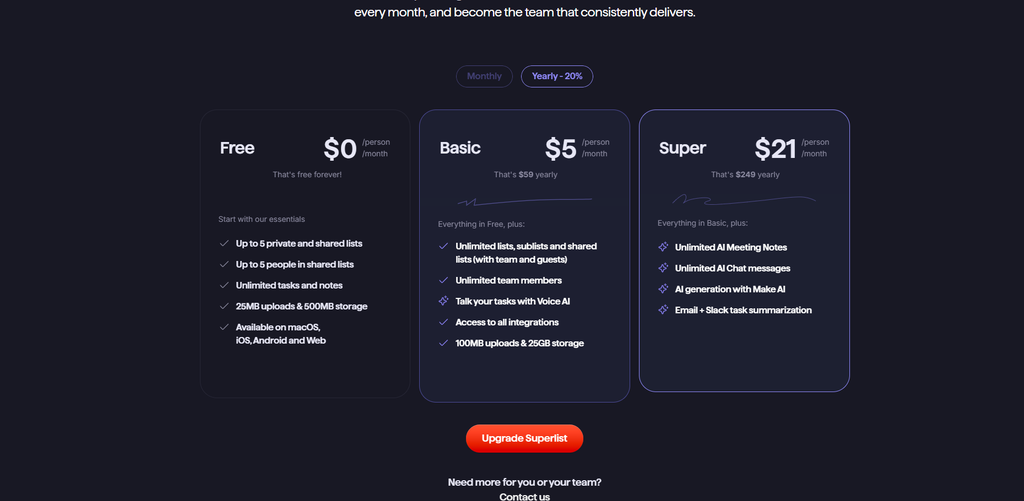
Free: $0/person/month — free forever. Up to 5 private and shared lists, up to 5 people in shared lists, unlimited tasks and notes, macOS/iOS/Android/Web, 25 MB uploads & 500 MB storage. Genuinely usable — a real free tier, unlike Akiflow/Sunsama’s trial-only model (but capped at 5 lists/5 people, narrower than TickTick’s free plan).
Basic: 5.00/person/month**, or **59.00/year — everything in Free, plus: unlimited lists/sublists/shared lists (with team and guests), access to all integrations, unlimited team members, Talk your tasks with Voice AI, 100 MB uploads & 25 GB storage.
Super: 21.00/person/month**, or **249.00/year — everything in Basic, plus: Unlimited AI Meeting Notes, Unlimited AI Chat messages, AI generation with Make AI, Email + Slack task summarization.
Price note (verified Sept 2026 from superlist.com + superlist.com/pricing): Plans are Free $0**, **Basic $5/mo ($59/yr)**, and **Super $21/mo ($249/yr). Billing is monthly or annual in advance; per person. No lifetime deal is offered (unlike Aevo’s €149). Free is capped at 5 lists and 5 collaborators.
Verdict on price: Superlist is mid-priced in this series. At 59/year Basic** it costs about the **same as Todoist Pro (60/yr) and ~1.18× TickTick Premium (49.99/yr) — the cheapest *paid* tier here alongside those two. At **249/year Super** it’s roughly 1.3× Akiflow (192/yr)** and **1.22× Sunsama (204/yr), and ~2.3× Timestripe (108/yr) or Aevo (~54/yr). You pay for a beautiful, unified tasks + notes workspace with AI capture, not for integrations breadth or calendar automation. The Free tier is real but capped; for unlimited personal use Basic at $59/year is the sweet spot.
What you get in Superlist (Basic / Super)
Superlist ships a focused, opinionated set of features — less integration breadth than Akiflow, but a uniquely fast and beautiful “everything in one place” experience:
- Tasks + notes in one — keep context where it belongs: add rich notes, images, and details directly to a task so execution and reference live together.
- Infinitely nested lists & subtasks — break big goals into small steps; organize projects with subtasks, layers, and checklists so you always know what’s next.
- Voice AI / Talk (Basic) — type or talk; say “Dentist Friday at 2pm” and Superlist schedules it. Voice memos become action items without opening the app.
- AI Meeting Notes & Chat (Super) — unlimited AI meeting notes, unlimited AI chat messages, and AI generation with Make AI turn calls and docs into captured work.
- Email + Slack task summarization (Super) — pull tasks out of your inbox and Slack so requests never live only in a thread.
- Quick add & widgets — add tasks from home/lock screen widgets; offline support keeps the list current.
- Real-time collaboration — shared lists, guests, and unlimited team members (paid); multiplatform across macOS/iOS/Android/Web.
- Recurring tasks & reminders — habits and routines that repeat automatically, from daily workouts to monthly bills.
Pros
- ✅ One beautiful home for tasks + notes + plans — the closest thing to “Wunderlist, but modern”; the most enjoyable UI in this series.
- ✅ Voice & AI capture — Talk (Basic) and AI Meeting Notes (Super) genuinely save the “I’ll remember later” tax.
- ✅ Infinitely nested lists — big projects stay tractable without a separate PM tool.
- ✅ Real free tier — usable forever (capped at 5 lists/5 people); cheaper entry than Akiflow/Sunsama.
- ✅ Light team collaboration — real-time shared lists + guests; good for client/freelance work.
- ✅ Multiplatform + offline — macOS, iOS, Android, Web, with offline support and widgets.
- ✅ From the makers of Wunderlist — pedigree and taste you can feel; “a little more fun” than the ultra-efficient rivals.
Cons
- ❌ AI assists, doesn’t run your day — no agentic auto-scheduling like Akiflow’s Aki; if you want the app to build your calendar, this isn’t it.
- ❌ No calendar time-blocking — it’s a task/notes workspace, not a drag-to-calendar planner like Akiflow/Sunsama.
- ❌ Integrations are vague + no public API — “all integrations” unlock on Basic, but there’s no published 2,000+ connector catalog and no documented REST API; power connectors live nowhere.
- ❌ Light PM depth — no Gantt, no workload views, no PM-grade reporting; not a real project-management tool.
- ❌ Capped free tier — 5 lists / 5 people; TickTick’s free plan is more generous for pure personal use.
- ❌ No lifetime deal — only subscription (Basic/Super).
Integrations that matter
- Voice AI (Talk, Basic) — spoken tasks and voice memos become action items; the fastest “out of your head” capture in this series.
- Email + Slack summarization (Super) — turn inbox and Slack threads into tasks so nothing hides in a conversation.
- “All integrations” (Basic+) — Superlist unlocks its integration set on Basic, but the specific catalog isn’t published the way Akiflow’s 2,000+ is; treat as the usual calendar/cloud suspects, not a power hub.
- Mobile & web — runs natively on macOS/iOS/Android and in the browser; offline support + widgets keep capture frictionless.
- No automation layer — there’s no documented public REST API and no MCP; automation is not a Superlist strength (unlike Akiflow’s MCP).
What Superlist is built for
Superlist is not a calendar and not a checklist — its own site frames it as the place where “tasks, priorities, and notes live in one fast, beautiful workspace.” Before you subscribe, here are the official application scenarios worth knowing:
- Plan your day — schedule tasks, reminders, and habits so you’re ready for the day ahead.
- Stay on top of work — track projects, deadlines, and meeting prep without getting overwhelmed.
- Keep home in sync — share grocery lists, chores, and family reminders so nothing slips.
- Move from talk to done — AI-powered meeting notes and a voice assistant turn speech into tasks.
- Break big goals down — infinitely nested lists and subtasks keep “what’s next” always visible.
- Capture from anywhere — widgets, offline support, and quick add keep ideas out of your head fast.
The method behind it. Superlist’s design rests on one principle: in a sea of ultra-efficient productivity tools, bring a little more fun to getting things done. Where Akiflow optimizes your calendar and Aevo strips out AI entirely, Superlist bets that the right amount of AI capture — voice, meetings, chat — plus a genuinely beautiful workspace will keep you using the tool daily. For creators who abandoned Wunderlist and want its soul back with 2026 powers, that bet lands.
Don’t just take our word for it. Superlist is built by the team behind Wunderlist and shows real App Store / Google Play love (“simple, beautiful, and extremely convenient,” “combination of Todoist and Notion,” “changes my life for the better”). It’s a funded, branded product with transparent pricing — larger social proof than the indie makers (Aevo, Timestripe) in this series, though still smaller than Notion-scale.
Verdict
Superlist review verdict: For a female founder or creator whose real problem is scattered thinking — tasks in one app, notes in another, plans in a third — Superlist is the most enjoyable way to pull everything into one fast, beautiful workspace: tasks + notes + infinitely nested lists + Voice AI is a genuinely better “one home for your work” than a flat to-do list, and at 5/month Basic (59/year) or 21/month Super (249/year) it’s fairly priced, with a real free tier to start. The catch is scope: it assists with AI rather than running your day, has no calendar time-blocking, and lighter PM depth than Akiflow. Start on the free plan, run one real project (a course, a content sprint, a launch) through its lists for a month, and only upgrade to Basic or Super if the unified, Wunderlist-soul workspace is worth more than the $59/year it costs. If your pain is calendar chaos, Akiflow or Sunsama is the better buy; if it’s scattered thinking and you want a little AI help, Superlist wins.
Explore further
- Sunsama Review 2026: The Calm Planner for Female Creators?
- Akiflow Review 2026: Time-Blocking Planner for Busy Female professionals?
- TickTick Review 2026: The Calm To-Do App for Busy Female Creators
- Todoist Review 2026: Best To-Do APP for Female Creators?
FAQ
Is there a free Superlist plan?
Yes — unlike Akiflow and Sunsama (trial-only), Superlist has a real free tier: up to 5 private/shared lists, up to 5 people, unlimited tasks and notes, all platforms, 25 MB uploads & 500 MB storage. It’s capped at 5 lists/5 people, so heavy users upgrade to Basic ($5/mo or $59/yr).
Does Superlist have AI?
Yes — and it leans in, unlike the deliberately AI-free Aevo. Basic includes Voice AI (Talk) that turns speech/voice memos into tasks; Super adds AI Meeting Notes, AI Chat, and Make AI generation, plus Email + Slack task summarization. It assists (capture, summarize) but does not auto-schedule your calendar the way Akiflow’s Aki does.
Does Superlist sync with Google Calendar / Outlook?
Superlist unlocks “all integrations” on Basic and is multiplatform with offline support, but it does not publish a two-way calendar time-block feature like Akiflow/Sunsama; treat calendar sync as part of its integration set rather than a drag-to-block planner. If calendar time-blocking is your core need, Akiflow or Sunsama fits better.
Is Superlist good for teams?
Lightly to moderately. Free supports up to 5 people in shared lists; paid adds unlimited team members, guests, and real-time collaboration. There’s no Gantt, no public API, and no PM-grade reporting — it’s a personal + light-collaboration workspace, not an Asana/ClickUp replacement.
Why trust our software reviews
We test every tool hands-on as working creators — not just reading spec sheets.