Akiflow Review 2026: Time-Blocking Planner for Busy Female professionals?
By HerYelle · Last updated on September 20, 2026.
Disclosure: HerYelle may earn a commission if you sign up through our links, at no extra cost to you. We only recommend tools we have tested ourselves.
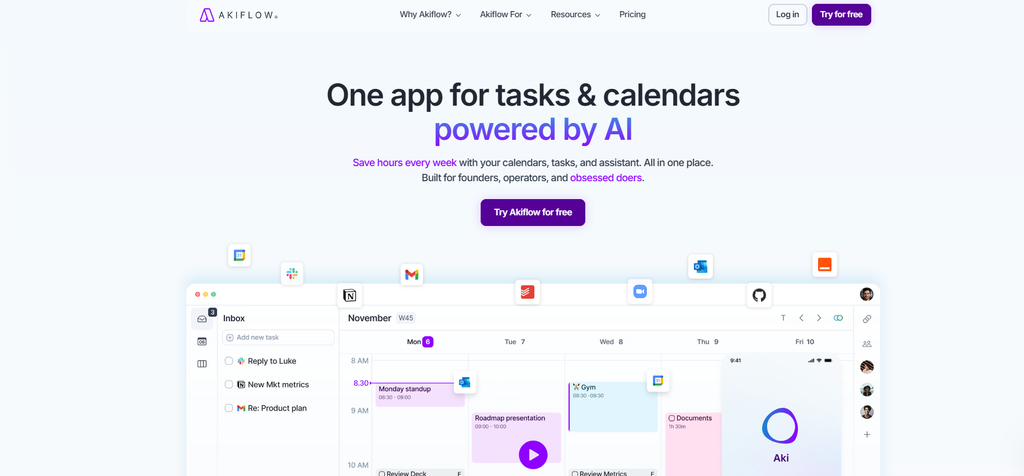
“One app for tasks & calendars, powered by AI.” — Akiflow’s own hero line. The official site frames it as “The All-in-One Productivity Suite” that brings “Calendar, tasks, inbox, and AI into one seamless flow” — “Built for founders, operators, and obsessed doers.” It is Designed in Italy and Backed by Y Combinator.
In this Akiflow review, we look at a planner that does the opposite of most to-do apps: instead of asking you to live inside yet another list, it pulls your tasks out of every other app and drops them onto a single calendar you actually control.
Akiflow launched in 2020 (YC-backed, founded by Nunzio Martinello and Sebastiano Favaro) and now serves 100,000+ ambitious professionals. Where TickTick and Todoist are task managers that added a calendar, Akiflow is a calendar that swallowed your task apps. That difference is the whole product.
Its own methodology — published free at akiflow.com/method — is built on five moves: Capture → Process → Plan → Execute → Review, with time blocking as the spine. We ran it for a week on a real solo-creator workflow (content, client work, and a personal life scattered across six tools) to see if the $34/month plan earns its place.
Akiflow review: bottom line
Akiflow is the integration-first time-blocking planner: if your tasks live in Notion, Slack, Gmail, Asana, and Linear while your schedule lives in Google Calendar, it is the fastest way to see everything in one place and protect time for deep work. It is not cheap (16–34/month, no free tier) and it is single-player by design — but for a busy female founder or creator who is tired of app-switching, the Universal Inbox + drag-to-calendar workflow is genuinely best-in-class.
Best for
- Founders & solo creators drowning in tabs — tasks from Notion + Slack + Gmail + Google Calendar consolidated into one daily inbox.
- Female founders running a business + content + life from one desk — the morning planning ritual forces you to choose, not just collect.
- Deep-work builders who want time blocking, Focus Mode, and a Focus Timer that actually guard the block (not just display it).
- Keyboard-first power users — the Command Bar (Cmd+K) and shortcuts make capture and scheduling a reflex.
- AI early adopters — Aki, the built-in AI executive assistant, plus a native MCP server (2026) so Claude or any MCP client can plan and reschedule your day by chat.
Not ideal if
- You need a free tool — Akiflow removed its free-forever plan in 2021; today it is a 7-day trial only ($34/mo monthly, $19/mo annual). For light personal use, Todoist’s free tier wins.
- You want team / shared project management — no Gantt, no team capacity planning, no shared workload visibility. Akiflow is single-player by design.
- You want AI to run the day unattended — Akiflow deliberately keeps the human in the loop (you confirm the plan). Reclaim.ai or Motion auto-schedule in the background.
- You are Apple/iCloud-only — Apple Calendar and Fastmail aren’t native; Apple users must route through Google Calendar.
- You are mobile-first — reviews consistently note the mobile app trails the desktop experience in depth.
Real-world example
Maya, a solo brand designer + content creator (Berlin-based, remote clients). Before Akiflow she ran her week across five surfaces: client projects in Notion, community DMs in Slack, invoices/email in Gmail, her actual schedule in Google Calendar, and a personal list in Apple Reminders. Every morning was a manual copy-paste triage.
Her Akiflow setup after a month:
- Universal Inbox pulls from Notion, Slack, Gmail, and Google Calendar with 2-way sync — one screen shows “Improve client website,” “Reply to community question,” and “Dentist 4pm” side by side.
- Daily planning ritual (the app prompts it): she blocks 90 minutes of deep design work first, then client calls, then a 25-minute Focus Timer for editing Reels.
- Command Bar (Cmd+K): types “Send invoice to studio tomorrow 10am” and it parses date + time + creates the task — no form-filling.
- Aki (AI assistant): on a chaotic Monday she typed “Clear my afternoon and push everything that isn’t on fire to tomorrow” — Aki rescheduled the low-priority blocks and kept the client call. “It felt like having a chief-of-staff who only does scheduling.” On lighter days she uses it for the moments when she thinks of a task but is too lazy to open the app — exactly the kind of friction Aki removes.
The cost is real: at $16/month annual she pays $192/year. For a one-person business, that math closes.
Team fit
| Use case | Fit |
| Solo female founder / creator | ⭐⭐⭐⭐⭐ ideal |
| Multi-tool knowledge worker | ⭐⭐⭐⭐⭐ ideal (50+ integrations) |
| Deep-work / focus builder | ⭐⭐⭐⭐⭐ time blocking + Focus Mode |
| Small team collaboration | ⭐⭐ limited — single-player by design |
| Agency / enterprise | ⭐⭐ no Gantt / capacity planning; Teams plan exists but thin |
| Apple-only personal use | ⭐⭐⭐ route via Google Calendar |
Pricing
Free: none — Akiflow removed its free-forever plan in 2021. Today there is only a 7-day free trial (extendable to 14 days if you book a 1:1 onboarding call), full Pro features, cancel anytime. A credit card / PayPal is required.
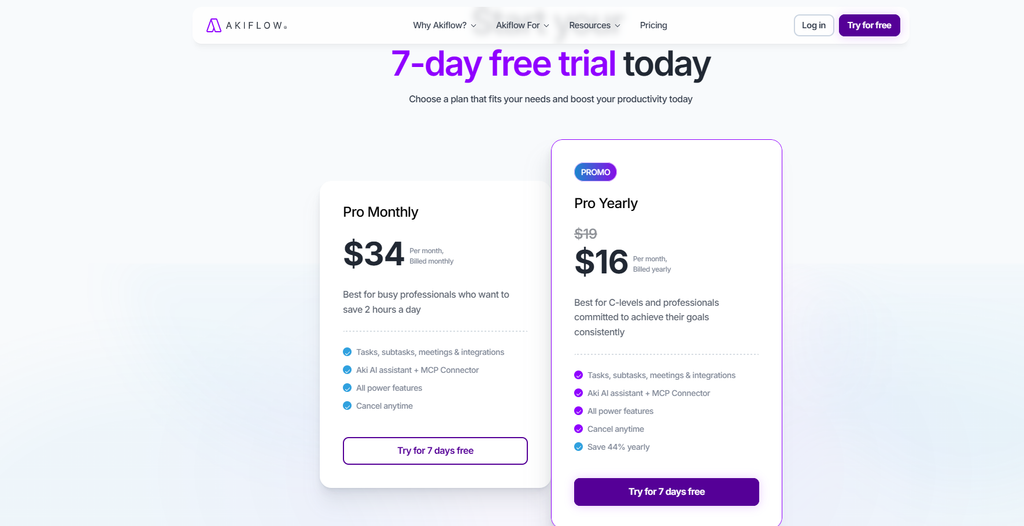
Pro Monthly: $34/month — unlimited integrations, unlimited tasks & meetings, all power features, Aki AI assistant.
Pro Yearly: 16/month, billed annually (192/year) — saves ~44% vs monthly, plus a free 1:1 onboarding call.
Verdict on price: Akiflow is one of the more expensive solo planners on the market — at 192/year it costs ~3.8× TickTick Premium (49.99/yr) and ~3.2× Todoist Pro ($60/yr). You pay for integration breadth and time-blocking polish, not for a bigger feature checklist. If you already live in 4+ apps and lose hours weekly to switching, the ROI calculator on their site (which assumes ~20 hours saved/month) makes it pay for itself. If you just need a personal to-do list, it is overkill — start free on TickTick.
What you get in Akiflow (Pro)
Unlike apps that gate features behind tiers, Akiflow ships one plan with everything:
- Universal Inbox — import tasks from 3,000+ tools (native 2-way sync with Slack, Gmail, Google Calendar, Outlook, Notion, Asana, Linear, Jira, Trello, Todoist, ClickUp, GitHub; thousands more via Zapier / IFTTT / Webhooks). A real user frames the payoff as “you don’t have to patrol ten apps every day.”
- Time Blocking / Time Slots — Akiflow calls itself “the world’s best time-blocking platform”. A real user describes Time Slots as “theme time containers”: tasks dropped into a slot inherit the project context, and anything unfinished can be Replan-rolled to a later slot rather than lost or rewritten. Drag tasks onto the calendar, lock blocks to a specific calendar, color-code, auto-plan undone tasks.
- Command Bar (Cmd+K) — create tasks, events, and meetings with keyboard shortcuts; natural-language parsing (“Call John tomorrow at 3pm for 1 hour”). One user called it “the command line of time management” because time, project, priority, and duration are parsed together.
- Aki — AI Executive Assistant — reviews incoming tasks, suggests a daily schedule, reschedules conflicts, sends daily briefings; voice commands and (coming soon) phone calls.
- Daily Rituals — forced morning planning + daily shutdown reviews; real users describe it as “morning Planning, evening Shutdown” that forces you to empty your Inbox and close the day. Turns planning into a habit, not a discipline you maintain alone.
- Focus Mode + Focus Timer — lock out distractions during a block.
- Goals, Stats, Task Countdown — track the Inbox-Zero streak and where your time actually goes.
- Offline Mode, Dark Mode, Privacy — work without internet; data-first privacy stance.
- Meeting Link / Share Availability — booking link for one-off or recurring meetings.
- Native MCP server (2026) — let Claude or any MCP client create, edit, and time-block tasks and read your schedule by chat.
Pros
- ✅ Widest integration footprint in the category — 3,000+ tools; native two-way sync for the dev/PM stack (Jira, Linear, Asana) competitors under-prioritize.
- ✅ Best-in-class time blocking — drag-to-calendar, smart time slots, conflict detection, lock-to-calendar.
- ✅ Forces the planning habit — the daily ritual + Focus Mode close the discipline gap, not just the tooling gap.
- ✅ Keyboard-first speed — Command Bar makes capture and scheduling a reflex.
- ✅ Aki + native MCP — one of the first task apps with true agent control, not a brittle REST API.
- ✅ Exceptional 1:1 onboarding — personalized setup call (free on annual), consistently praised in reviews.
- ✅ Credible backing — YC-backed, Designed in Italy, G2 4.8/5 (99 reviews), 100,000+ users.
Cons
- ❌ No free tier — only a 7-day trial (14 with onboarding). Light users should use Todoist free.
- ❌ Expensive — $34/mo monthly, $16/mo annual ($192/yr); ~3.8× TickTick. The value only shows if you use the integrations + time blocking daily.
- ❌ Single-player — no team capacity planning, Gantt, or shared workload visibility.
- ❌ Human-in-the-loop AI — Aki plans, you confirm; no fully unattended auto-scheduling like Reclaim.ai / Motion.
- ❌ Apple/iCloud not native — Apple users must route through Google Calendar; Fastmail also unsupported.
- ❌ Mobile trails desktop — the app is deepest on desktop/macOS; mobile is lighter.
- ❌ No public REST API — MCP / Zapier / IFTTT / Webhooks only (users have requested a real API for years).
Integrations that matter
- Calendar: native 2-way sync with Google Calendar and Outlook; view modes day / week / month; drag & drop; conflict detection.
- Email & chat: Gmail, Outlook, Slack, Microsoft Teams — turn emails and Slack messages into tasks in one click; forward to Aki.
- PM / dev tools: Notion, Asana, Linear, Jira, Trello, Todoist, ClickUp, GitHub (native); thousands more via Zapier / IFTTT.
- AI / MCP: native Akiflow MCP server (2026) for Claude and MCP clients; Aki assistant built in; Zapier + IFTTT for automation.
- Meeting: Zoom conferencing embedded in events; Meeting Assistant add-on for transcription + summaries.
What Akiflow is built for
Akiflow is not a checklist — its own site and free methodology frame it as a system for intentional productivity. Before you subscribe, here are the official application scenarios worth knowing:
- One app for tasks & calendars — “Save hours every week with your calendars, tasks, and assistant. All in one place.”
- Universal Inbox — “All your work, captured and organized”: import from 2,000+ tools with 2-way sync; emails and Slack messages become tasks in one click. A real user frames the payoff as “you don’t have to patrol ten apps every day.”
- Time Blocking / Time Slots — “Master Your Schedule with the world’s best time-blocking platform”: allocate focused periods, drag tasks onto the calendar, auto-plan undone work. Time Slots act as “theme time containers” that carry project context and can Replan unfinished work forward.
- The All-in-One Productivity Suite — “Calendar, tasks, inbox, and AI into one seamless flow. With you in control.”
- Smart Time Slots & Auto-schedule — “Schedules for you. In one click.” / “Plan your day, week, automatically.”
- Executive AI Assistant (Aki) — “Your Always-On AI Sidekick”: reviews tasks, suggests the daily plan, reschedules conflicts, daily briefings; voice commands; (coming soon) phone calls.
- Daily Rituals — morning planning + daily shutdown, the science-based method made into a feature.
- Focus Time / Focus Mode / Focus Timer — guard deep work against distractions.
- Goals, Stats, Task Countdown — track the Inbox-Zero streak and analyze time spent.
- Meeting Link / Share Availability — book one-off or recurring meetings via a scheduling link.
- Capture at the speed of thought — iOS & Android, Voice Mode, AI Chat, Cmd+K natural-language input.
- Offline Mode, Dark Mode, Privacy — work anywhere, data-first.
The method behind it. Akiflow’s free Method (akiflow.com/method) distills productivity into five moves — Capture → Process → Plan → Execute → Review — built on Intentional Productivity, Goal Clarity, Time Blocking, and Continuous Improvement. The “Separating Planning from Doing” principle (inbox = decide, today list = act) is the philosophical core that separates it from a plain calendar.
Don’t just take our word for it. Akiflow is Backed by Y Combinator, Designed in Italy, and “Trusted by 100,000+ of ambitious busy professionals and teams worldwide” with a G2 score of 4.8/5 across ~99 reviews — rare credibility for a solo-focused planner.
Verdict
Akiflow review verdict: For a female founder or creator whose work is fragmented across five apps, Akiflow is the fastest path to one calendar you actually control — Universal Inbox + drag-to-calendar + Aki is a genuinely better daily workflow than maintaining six. The catch is price and philosophy: 16–34/month with no free tier, and it keeps you in the planning loop rather than auto-running your day. Start with the 7-day trial, run your real week through it, and only subscribe if the integration + time-blocking combo saves you more than the $192/year it costs. If you just need a personal list, TickTick’s $49.99/year is the smarter buy.
Explore further
- TickTick Review 2026: The Calm To-Do App for Busy Female Creators
- Todoist Review 2026: Best To-Do APP for Female Creators?
FAQ
Is there a free Akiflow plan?
No — Akiflow removed its free-forever plan. There is a 7-day free trial (extendable to 14 days by booking a 1:1 onboarding call), then you must subscribe.
Does Akiflow have AI?
Yes — Aki, the built-in AI executive assistant, plans and reschedules your day, sends daily briefings, and takes voice commands. Plus a native MCP server (2026) lets Claude or any MCP client create, edit, and time-block tasks by chat.
Does Akiflow work with Apple Calendar?
Not natively. Apple Calendar and Fastmail aren’t supported; Apple users must sync through Google Calendar.